
To shop all of these arcade sticks in one place directly on Amazon, click here.
1. Haute42 C-AS
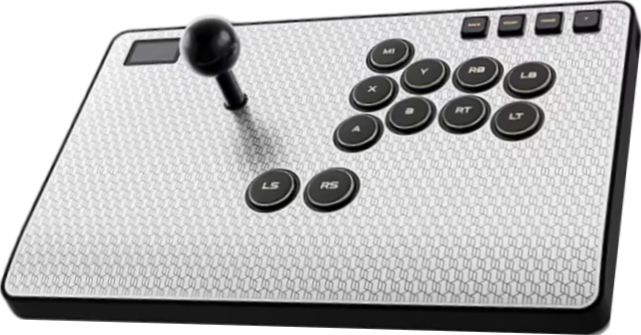
After Haute42 dominated the leverless controller market, this award winning company decided to release an excellent arcade stick: the C-AS. It comes with lots of freebies, such as a magnetic joystick. You actually get to pick from these three gates:
- Octagonal gate
- Circular gate
- Square gate
The joystick is teamed up with PBT buttons that feel “dry”, and the buttons are in the popular Sega 2P layout. The C-AS has 11 primary buttons. By default, the extra index button is for macros, and the two thumb buttons are for the left & right sticks.
You can also replace the thumb buttons with analog sticks if needed. Otherwise, it’s important to mention that the C-AS uses Wind Engine switches for quiet yet still fast presses. Still, you can swap the switches with other ones if you want.
More importantly, the C-AS has adjustable button travel to find your ideal travel. The arcade stick also has a tournament lock to disable the function buttons whenever needed.
Hardware-wise, the C-AS is large and heavy yet slim. Up top, it has an aluminum alloy panel that can be ejected with the press of a single button. At the bottom, you can find the grip pad that keeps the arcade stick stable. Not just that, the arcade stick has a slope to keep your wrists comfortable.
Other than that, the OLED screen onboard the C-AS can show you:
- Live button press animation
- Custom splash screen
- SOCD cleaning mode
- Directional mode
- Input mode
- Turbo mode
Furthermore, the C-AS has three USB ports. The left USB-C port is standard, whereas the USB-C port in the back has a locking mechanism to keep the cable secure. Then, you have the USB-A port that can accept a dongle like the BOOTER 5 to make the arcade stick compatible with the PS5.
Inside the C-AS, you can find a storage area that has a couple of spare switches and more freebies. Aside from that, the arcade stick comes in silver, gold, and purple editions. Finally, custom RGB backlighting and button LEDs can make the arcade stick glow nicely.
Why to Buy
With quieter switches, the C-AS has more buttons than usual, and you can set your desired button travel. You can even replace the thumb buttons with analog sticks if wanted. You get to pick from three gates for the joystick as well. Lastly, the color options for this metallic arcade stick are neat.
Where to Buy
Buy now on Amazon: Silver / Gold / Purple
Buy now on AliExpress
2. Mayflash F700 Elite
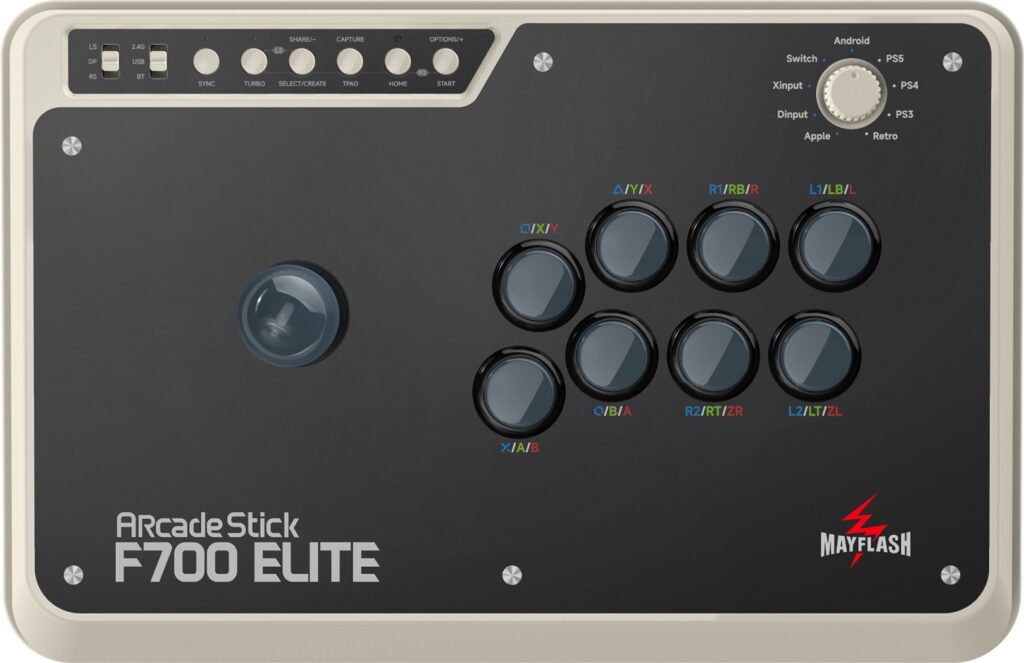
The Mayflash F700 Elite is wireless with a battery that can last more than a dozen hours after only a few hours of charging, so you can enjoy a gaming marathon with it. You can also go for a USB-C connection.
The left panel of the F700 Elite has a door that reveals a storage compartment, and this compartment is where you can also find the USB-C cable. The inside is neat, and the wiring is organized, making modding easier for you.
The F700 Elite is similar to previous Mayflash arcade sticks, but there are some improvements, such as a knob on the top panel to pick a console. Speaking of which, grab the adapter for PS5 compatibility.
The main improvement of this arcade stick over the original F700 is usage of the Sanwa parts, meaning a Sanwa joystick & buttons that are responsive and durable.
There is plenty of space between the F700 Elite’s joystick and buttons for your comfort while you play, and since the arcade stick is mod friendly, you can still install parts like Seimitsu ones if you want.
In addition to a microphone mute button, the F700 Elite has a headphone jack, and these features help you stay focused. Also, through turbo mode, you can press a button once, and that would result in multiple inputs, requiring less effort from you.
The decent weight of the F700 Elite means it should not slip during an intense session. The arcade stick is a bit bigger than the F500 as well as slightly heavier, upping the stability.
The F700 Elite’s art is customizable, and we at The Arcade Stick can provide you our art service to speed up the customization process. We have had plenty of experience making art for Mayflash controllers. Once you receive your beautiful art, just remove the cover, slide your printed art under it, and put the cover back on!
Why to Buy
The F700 Elite has an overpowered combo of premium parts and spaciousness. Plus, it has a headphone jack, and it can be used wirelessly as well.
Where to Buy
Buy now on Amazon
3. Mayflash F500 Elite
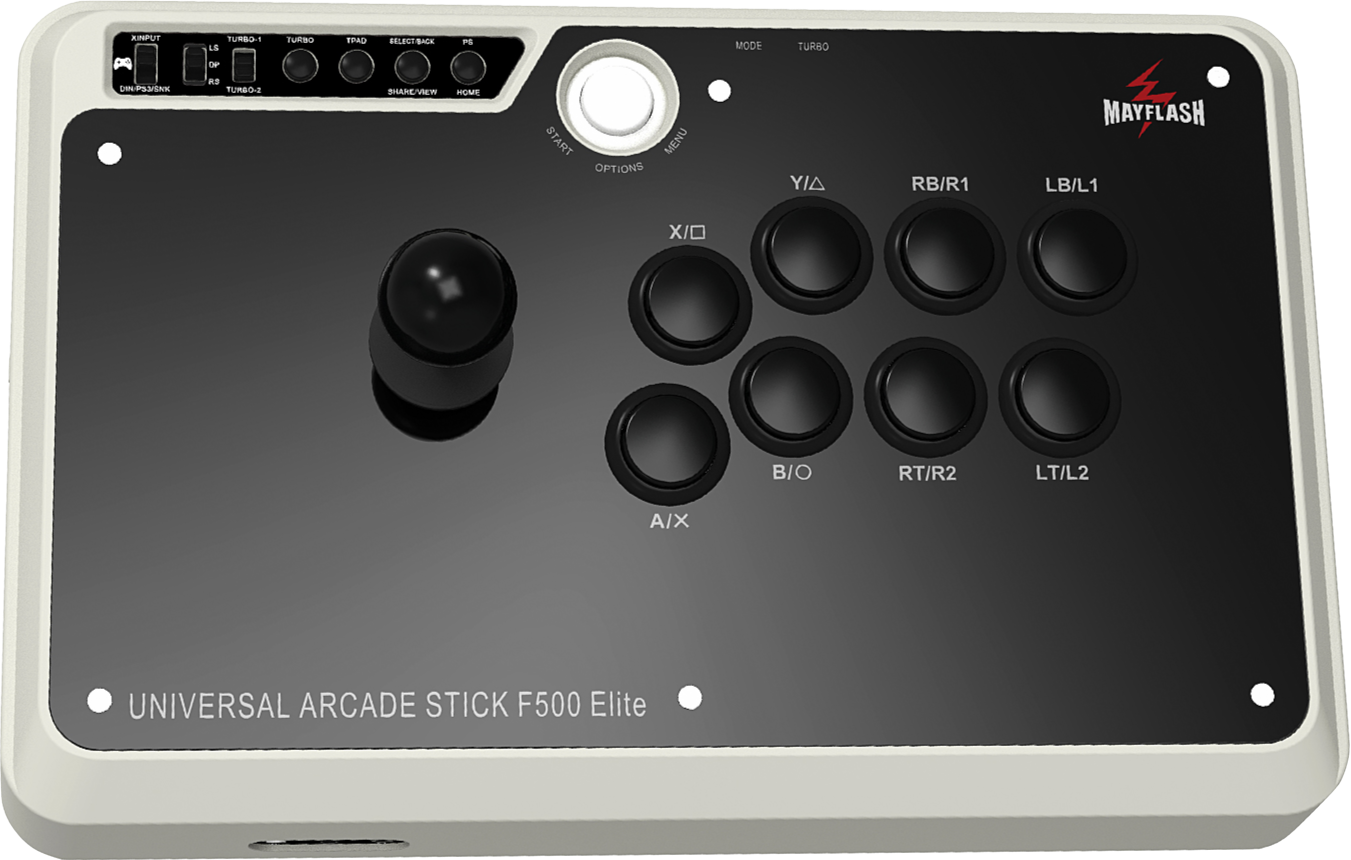
The Mayflash F500 Elite is an arcade stick with excellent Sanwa parts, turbo support, and updatable firmware. An octagonal joystick gate is also included for you as an accessory.
Replacing the F500 Elite’s joystick gate is rather simple. There are screws at the bottom that are easy to see for access to the arcade stick’s interior. There is also ample wrist space, providing you comfort during a gaming session. The metal case and rubber feet enhance the weight & stability of the arcade stick.
You can use wired headphones with the F500 Elite to avoid getting distracted during a serious match. The acrylic panel on top is easily removable, so if you would like to customize the arcade stick’s art with an idea you have, we can print it. Also, do not forget your adapter for PS5 compatibility.
Why to Buy
The F500 Elite is worth a buy if you would like the same premium parts as the F700 Elite but a slightly smaller size.
Where to Buy
Buy now on Amazon
4. Qanba Obsidian 2
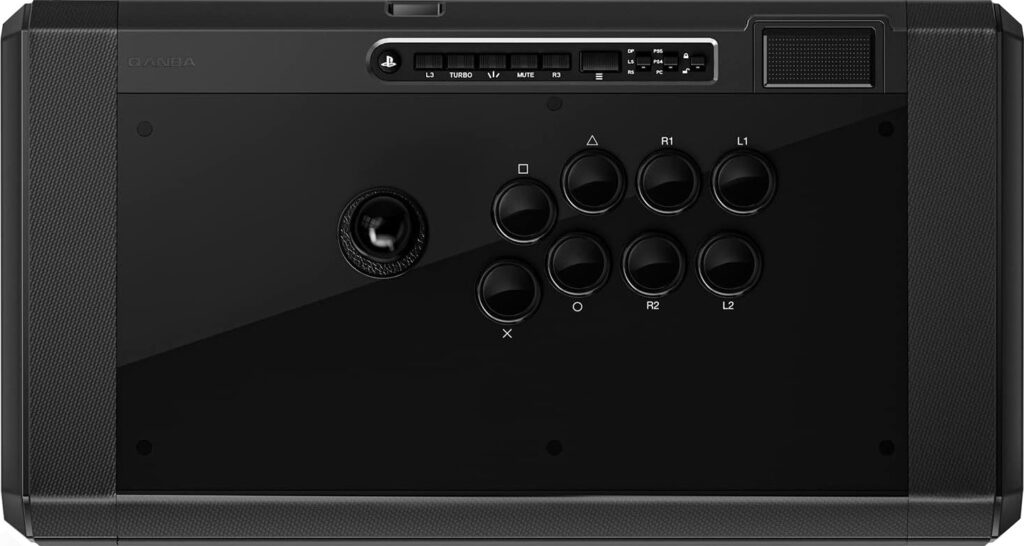
The Qanba Obsidian 2 is a heavier arcade stick with quality parts, which include a Sanwa joystick and buttons. You can also find a touchpad, microphone input, and cable compartment on the arcade stick’s side. Since it is officially licensed by Sony, the arcade stick is expected to work on future PlayStation consoles.
With an anti-slip base pad, the focal point of the Obsidian 2 is the joystick interchangeability. You see, Sanwa JLF joystick tops are swappable, and included with the arcade stick is a ball top & bat top, allowing you to be pick freely.
With thumb-screw access, the compartment on the Obsidian 2’s right can hold a couple of joystick tops (as well as cables). This compartment is not flimsy, and the same can be said about the side compartment in addition.
There is dedicated joystick access from the bottom of the Obsidian 2, and the interior of the arcade stick is quite tidy. Otherwise, if you would like to print custom art for your arcade stick, that is possible, making the arcade stick reflect your taste, such as by displaying your favorite character.
Why to Buy
The Obsidian 2’s weight and width make it stable on both your desk & lap, and it uses high end Sanwa parts—including ball & bat tops for the lever.
Where to Buy
Buy now on Amazon or AliExpress
5. Qanba Drone 2
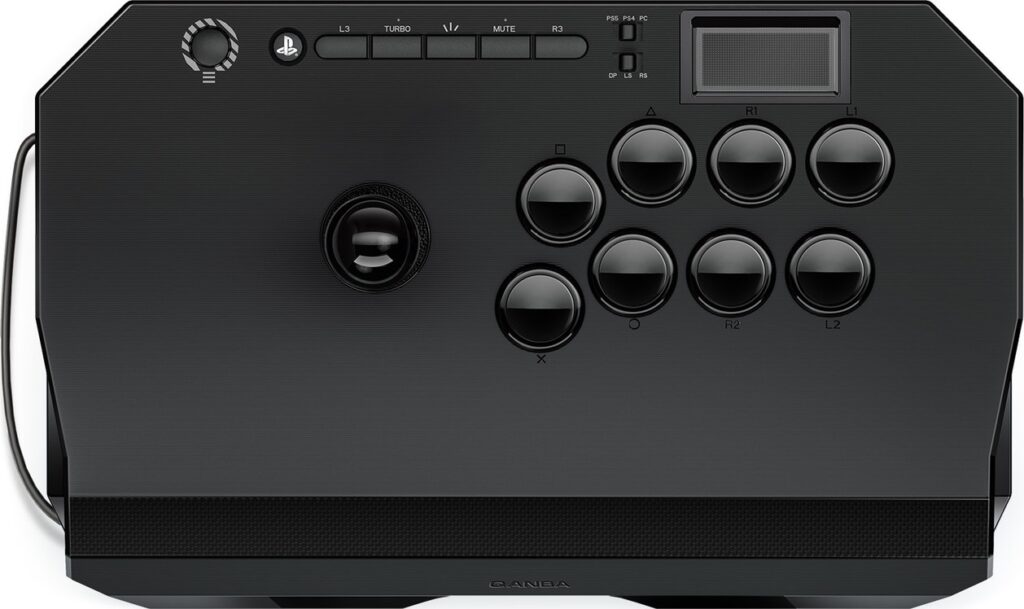
The Qanba Drone 2 features a Qanba joystick and buttons. There is also a touchpad and audio jack, the latter of which can keep you laser-focused during play. The upgraded joystick produces clicky feedback, so you can hear what is happening with your movements. As this is a Sony-licensed arcade stick, it can be expected to work on future PlayStation consoles as well.
The Drone 2’s interior is organized and makes modding easier, such as if you would like to change the joystick to something like Sanwa. There are rubber feet at the bottom, which is where you will also find an entry point to the joystick for faster, more convenient access.
As for the size of the Drone 2, it is small enough to be a mini arcade stick without sacrificing space for your wrists to rest. The arcade stick’s cable goes into its spacious side. Overall, the arcade stick is quite light, making it optimal for you to carry about. Plus, the matte black color looks quite stylish, and we can also print vinyl art for this arcade stick.
Why to Buy
If you prefer a Qanba arcade stick with actual Qanba parts, then the compact Drone 2 is your go-to arcade stick, but still, you can install a Sanwa joystick, and the audio jack can help you stay in the zone while playing.
Where to Buy
Buy now on Amazon or AliExpress
6. Qanba Titan
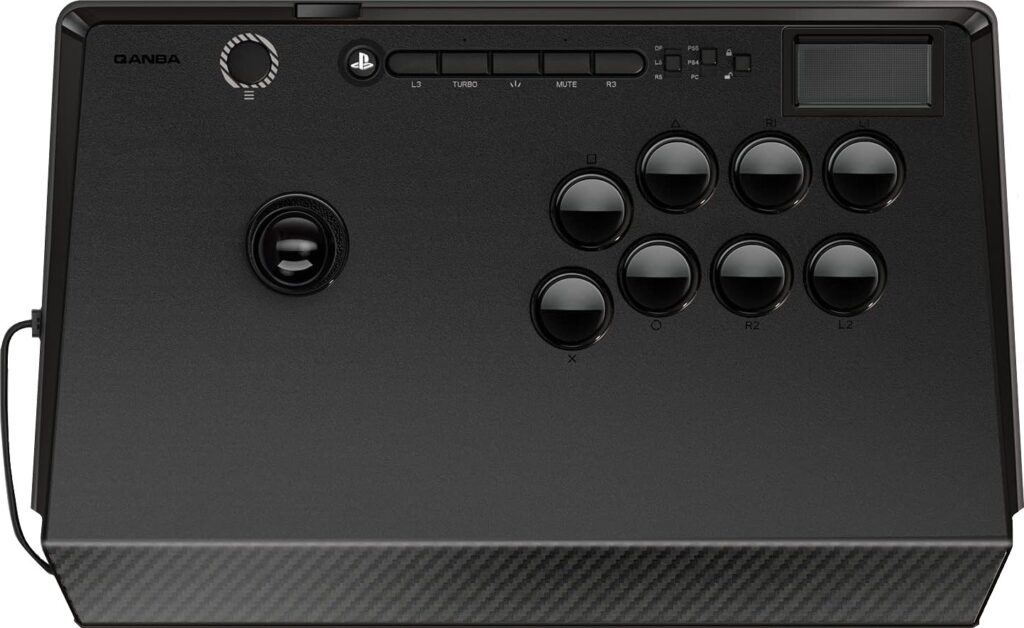
The Qanba Titan has a Sanwa joystick and buttons, so you can expect stellar performance. Also, there is a touchpad, microphone jack, and space to store the cable. The arcade stick is officially licensed by Sony, so it is expected to work on future PlayStation consoles too.
The increased distance between the joystick and buttons of the Titan allows more room for your hands to move about. The arcade stick’s weight is enhanced by steel plates inside, and there is a rubber base at the bottom for added stability. As for the arcade stick’s top panel, it should not flex easily.
If you open the Titan up, you will see the color coded interior, but if you simply need joystick access, there is a compartment at the bottom, so you do not need to unscrew the whole panel. You can even use the compartment’s lid to unscrew the joystick.
Why to Buy
The Titan is the best of both worlds: it’s a smaller arcade stick, but there’s a lot of breathing room between the joystick and buttons.
Where to Buy
Buy now on Amazon or AliExpress
7. Qanba Dragon
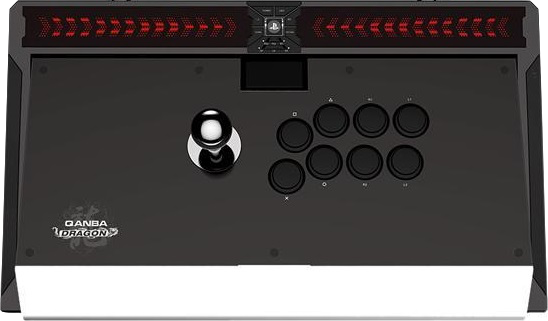
Did the Qanba Dragon come out a long time ago? Yes, but it’s still a fantastic arcade stick, and it’s withstood the test of time. Plus, what’s cooler than owning an arcade stick called “Dragon”?
In terms of size and weight, the Dragon can jokingly be referred to an actual dragon. Thankfully, there’s a dedicated bag by Qanba for this arcade stick called the Aegis.
One good thing about the Dragon’s size is that it can fit on your lap without needing to squeeze your legs together. Another good thing is its stability on a desk. There’s even anti-slip rubber for that purpose.
Truth be told, the Dragon’s sheer size is itself a sign of beauty and may even intimidate foes with its gargantuan nature. You see, this arcade stick features a pleasing mixture of an aluminum alloy bevel and a jet black surface.
Not just that, the Dragon features LEDs that light it up like it’s the Las Vegas strip. Moreover, you can apply some custom art to this arcade stick to make it showcase the characters you adore.
Regarding cable management, Qanba did well designing the back hooks around which the Dragon’s cable can be wrapped. This Sony-licensed arcade stick’s cable is braided and, needless to say, free of lag.
The hardware aspect in which the Dragon truly shines is its interior access, which is spacious and intuitive. Lucky for you, accessing the interior can be done with one touch.
Why to Buy
The metallic Dragon is one of the biggest, heaviest, and most unique looking arcade sticks—even with its own bag. Its one touch opening is unbeatable, and its back hooks allow you to store the cable with ease.
Where to Buy
Buy now on Amazon or AliExpress
8. Hori Fighting Stick α
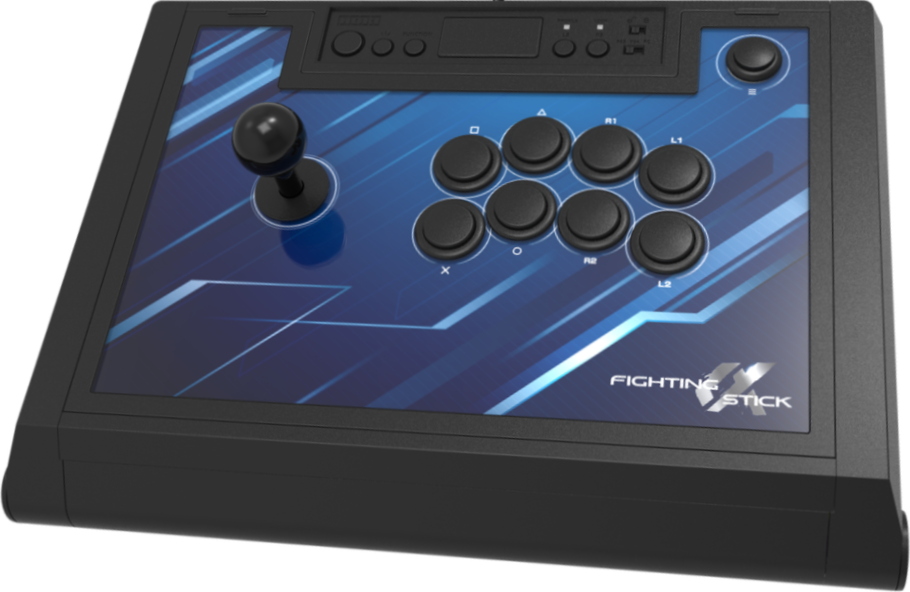
The Hayabusa joystick and buttons of the Hori Fighting Stick α are responsive. There are long rubber pads on both sides of the arcade stick, keeping it stable on your desk. Licensed by Sony, you can expect this arcade stick to work on upcoming PlayStation consoles as well, saving you money.
The Hori Fighting Stick α is noticeably lighter than average, making traveling with it convenient. Nonetheless, it feels well built and durable because of the metallic top plate (as well as the quality plastic).
Opening up the Hori Fighting Stick α using the latch in the back is a seamless experience. The artwork is customizable, so you can make the arcade stick a mirror image of yourself with our print.
Why to Buy
The bestselling Hori Fighting Stick α’s back latch makes it one of the easier arcade sticks to customize the art of.
Where to Buy
Buy now on Amazon
9. Nacon Daija
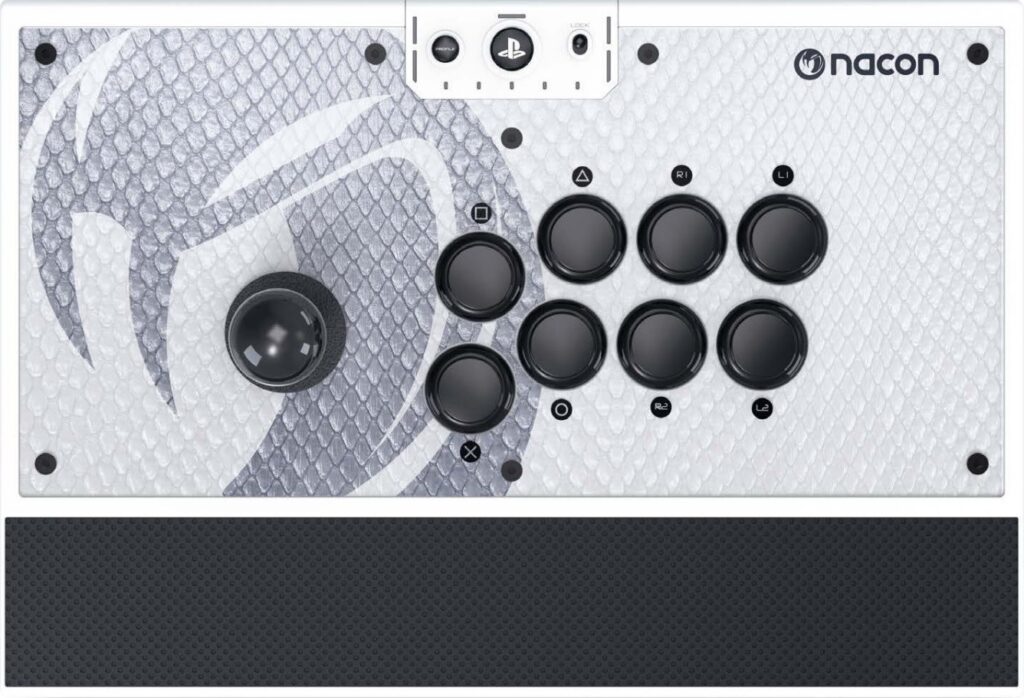
The Nacon Daija was one of the favorites in the last console generation, and it’s back. This Sony-licensed arcade stick was developed in collaboration with the French professional player, Kayane.
The Sanwa joystick and buttons make a return—as well as an additional bat-top joystick. The ball top & bat top can easily be removed and replaced given the screw-on system. Also, the Daija has a textured rest for your palms.
The Daija is quite hefty, boosting stability. Opening the arcade stick’s lid is easy since there are two buttons on the sides that can be pressed to pop open the lid and find tools like a screwdriver.
There’s also additional storage space within the Daija. Included with the arcade stick are a detachable USB cable and audio jack, the latter of which can help you focus during a hectic match.
The arcade stick comes in white or black, and available are three faceplate options—meaning the art is customizable. If you’ve got a Daija design already, we can print it for you. Finally, the LED rocks, making the arcade stick brighten up.
Why to Buy
It feels good to own an arcade stick like the Daija that was developed with a pro (Kayane). Moreover, it has Sony licensing, Sanwa parts, an additional bat top, a two-button opening, storage space, an audio jack, and custom art etc.
Where to Buy
Buy now on Amazon
10. Victrix Pro FS
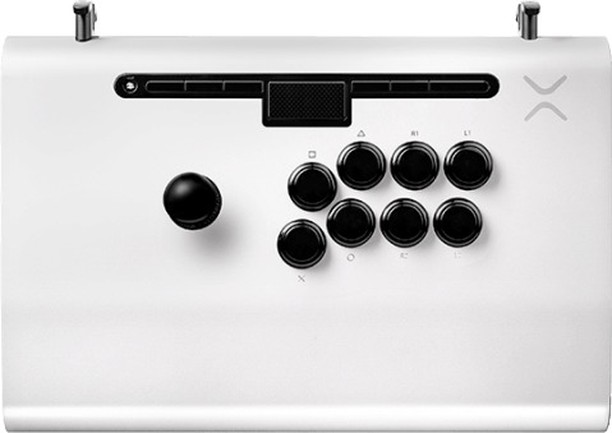
The Victrix Pro FS was one of the most popular arcade sticks of the last generation, and it made a comeback with native PlayStation 5 compatibility (and official Sony licensing)—plus a white edition. Fortunately, purple is still an option.
The buttons are Sanwa, and there’s a tournament mode to avoid pressing the function buttons during play. The wrist space is ergonomically sloped for your comfort, and there’s an anti-slip foam pad at the bottom. Also, there’s an audio jack to keep you locked in while using the Pro FS.
Impressively, the Pro FS is made of aircraft-quality aluminum. The carrying handles & cable organizers allow for maximum convenience, and the fast-access back panel allows for the swapping of components easily.
Of course, modding the Pro FS is possible if needed. With it, you also get a braided USB-C cable, Allen wrench, and storage bag. Let us know if you’d like a vinyl print of some custom art!
Why to Buy
The aircraft-grade aluminum of the Pro FS is hard to pass up, and other awesome features include: Sanwa buttons, a wrist slope, an audio jack, carrying handles, a quick-access back panel, a braided cable, and a storage bag.
Where to Buy
Buy now on Amazon
To shop all of these arcade sticks in one place directly on Amazon, click here.