
1. Haute42 C16
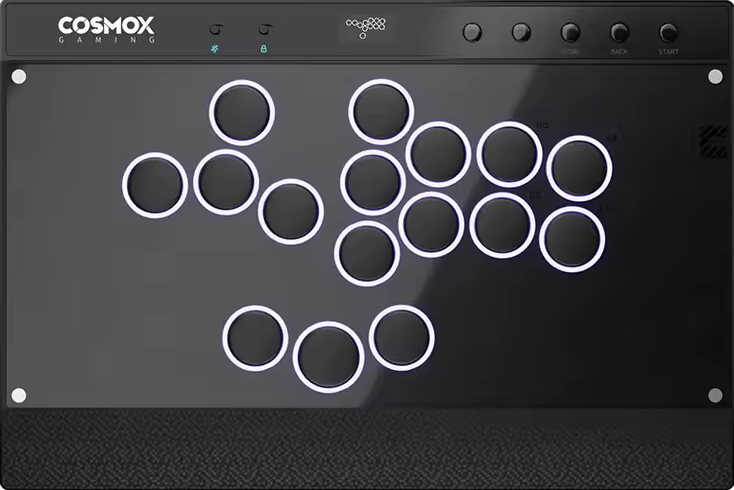
The Haute42 C16 ticks the following boxes:
- It has 16 buttons.
- It has a wrist resting slope.
- It has an information screen.
- It has enough function buttons.
If the C16’s switches aren’t your style, they’re hot swappable, so you can install other switches you prefer. That said, the controller should be wide enough to place on your lap without having to squeeze your legs together. It’s also quite slim.
Needless to say, the C16 has a little screen, and it’s nice to see it in the very center instead of to the side. On it, you can see important information like your:
- SOCD cleaning mode
- Directional mode
- Input mode
- Button presses
That said, the C16 has a USB-A port that can accept a compatibility extending adapter to make it compatible with more consoles. Essentially, the controller runs on the acclaimed GP2040-CE firmware known for its open source design, decent compatibility, web configuration, online updates, and practically no lag.
Not only that, custom RGB LED can make your C16 light up like a festival. With four screws holding the top panel together, the controller’s art is customizable. For that, we at The Arcade Stick have a custom art service.
Why to Buy
The C16 has a right index button, and it also has two extra thumb buttons that are horizontally aligned—keeping your thumbs positioned symmetrically.
Where to Buy
Buy now on AliExpress or Amazon
2. Haute42 C-AT

Given the C16’s groundbreaking success, Haute42 released the C-AT, which is its first attempt at an 18 button controller. Spoiler: It’s a successful attempt!
That being said, the AT part of the C-AT’s name stands for adjustable travel. You see, the main buttons allow you to adjust their travel distance:
- The long level is 0.3 mm.
- The medium level is 0.6 mm.
- The short level is 1.0 mm.
The six extra buttons (beyond the classic 12 button layout) give the C-AT more than one layout, such as a split layout that gives your hands more breathing room.
The C-AT’s buttons have a bit of a dry texture to them, and they utilize the snappy Wind Engine switches that trigger quickly—whereas the tactile, clicky, and hot swappable switches have a fully POM housing & stem in a way that reduces friction, resulting in smooth keystrokes.
It’s also awesome that the C-AT’s grip pad almost covers the entire bottom panel. It’s nice that the cable is braided too. What’s also nice is how the USB-C port in the back center is lockable.
There’s also another USB-C port on the left side. On the right side, there’s a USB-A port where you can insert an adapter to make your C-AT compatible with additional consoles.
You can actually buy a C-AT in black or white, and you can also paste a wrist rest sticker with art, such as:
- Character throwing a fireball
- Geometric shapes
- Something else
Don’t like the preset artworks? Just like the C-AT’s wrist rest is magnetically detachable, you can also magnetically lift up the top panel with the press of one button.
That way, you can insert brand new art that represents you, which we can print. Finally, the C-AT’s buttons can benefit from LED that lights them up well.
Why to Buy
With the C-AT, Haute42 improved many things—like giving you the freedom to adjust the buttons’ travel distance. Moreover, the 18 buttons give you access to more than one layout—in a way that can give you a competitive advantage—and customizing the art is super easy due to the magnetic top panel.
Where to Buy
Buy now on AliExpress: Standard / Metal
Buy now on Amazon: White / Black
3. Haute42 M Ultra Gen2

Following the M16 Ultra’s earth shattering success, the award winning Haute42 made a sequel: the M Ultra Gen2. This controller’s main improvement over its bestselling predecessor is having a left pinky button, whereas the two buttons surrounding the jump button are aligned horizontally.
That being said, the M Ultra Gen2 features the fast Shadow Hunting low profile switches, yet if you prefer other switches, you can just hot swap them.
Structurally, the M Ultra Gen2 is an aluminum alloy controller that’s heavy enough to be stable without being too heavy to carry. It also has an ergonomic slope for your wrists to rest, and the bottom has a grip pad for each one of your legs. About the controller’s slimness and size, they make it possibly fit into a tablet sleeve you already have.
Moving on, the M Ultra Gen2 runs on the highly prized GP2040-CE firmware. Not only that, there’s an OLED screen to show you the current:
- Input mode
- SOCD mode
- Directional mode
- Button press animation
In addition to two USB-C ports, an EXT port can be found on the M Ultra Gen2’s right, and this extra port allows you to insert an adapter for additional console compatibility options.
Aesthetically, the M Ultra Gen2 can have a black or blue color—with tasteful accents. Finally, you have RGB LED that brings the controller to life. If you’d like to add art to this controller, we’d be glad to print the art.
Why to Buy
The M Ultra Gen2’s aluminum alloy relieves you from acrylic smudges. It has a left pinky button, and its extra thumb buttons are aligned in a horizontally straight way that’s intuitive.
Where to Buy
Buy now on AliExpress or Amazon
4. Qanba Sapphire

The Qanba Sapphire has 18 Qanba Gravity buttons, and the leftmost button is for your pinky. That said, the Cherry MX Speed Silver switches are hot swappable, but if you stick to these standard profile switches, you may be glad to know that they’re:
- Linear
- Fast
- Quiet
- Smooth
- Durable
The Sapphire is a thin controller, and it has a detachable memory foam slope where you can rest your wrists. If you remove this foam slope, you can reveal items like an adjuster. You can rotate this adjuster on the desired button to choose from the following travel distances:
- Long
- Medium
- Short
On the Sapphire’s screen, you can see your chosen button mapping configuration, and there’s a toggle to cycle through your saved button mapping configuration files.
Another cool aspect about the Sapphire is that its rubber pad covers the whole bottom. Additionally, the USB-C cable is detachable from its hinged compartment that has a locking function, making travel more convenient (especially if you use the included shoulder strap). You can also find a headset jack in the controller’s back to stay focused mid-match.
One style choice you can make is either a colorful foam slope or just a black flat panel for your wrists. As for the Sapphire’s glow button, it’s to control the LED that can glow through the buttons and sides. If you’d like your controller to stand out even more, consider customizing its art, which we can print.
Why to Buy
With 18 buttons, the Sapphire has more buttons than most competitors—yet you can still cover any unwanted buttons.
Where to Buy
Buy now on AliExpress or Amazon
5. Victrix Pro KO
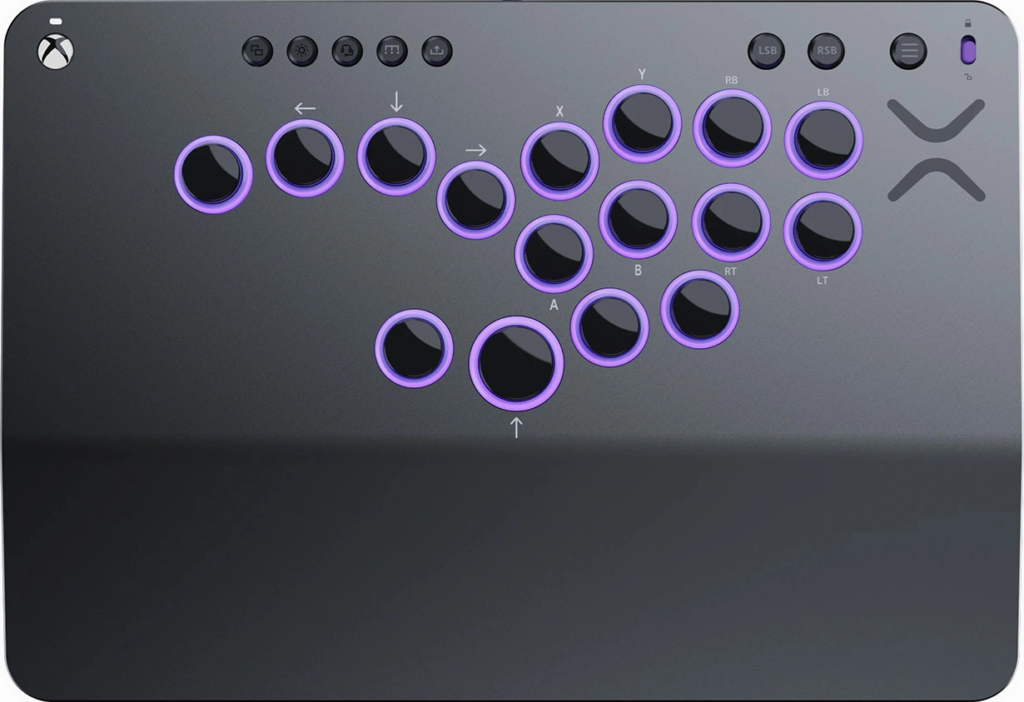
The Victrix Pro KO has 16 movable and mappable Victrix buttons. To make sure the button layout is suitable for fighting gamers, it was optimized by the Japanese fighting game legend, Momochi. Also, there’s plenty of resting space for your wrists—and at an ergonomic angle.
With hot swappable Cherry MX Speed Silver switches, the Pro KO strives for precision with every press. As for the RGB LED, it glows around each button, and you can customize the color combinations through Victrix’s own software.
Not only is the Pro KO slim, it also has built-in storage for:
- Buttons
- Button covers
- Light rings
- Switches
That said, the Pro KO has an audio port for microphone input and stereo output, making it easier for you to stay in the zone. The aluminum top plate is also removable for easier modding, and you can have it laser engraved as well. You can even apply a vinyl print on it. The braided USB-C cable is detachable for your convenience too.
As for the Pro KO’s mounting posts, they allow for a handle or shoulder strap, letting you easily carry the controller. Your order should also arrive with a protective sleeve, by the way.
Why to Buy
The Pro KO has two extra right thumb buttons, and the fact that you can cover any unwanted buttons is useful.
Where to Buy
Buy now on Amazon
6. 8BitDo Arcade Controller

After the 8BitDo Arcade Stick’s immense success, 8BitDo came up with the 8BitDo Arcade Controller. This controller is also thinner, so it’s likelier to fit into a tablet sleeve you already own.
Compared to most 16 button controllers, the 8BitDo Arcade Controller does something a little different: the extra buttons are bean-shaped and ergonomically slanted. This shape gives you more surface area to press the buttons without the need for 100% precision.
The 8BitDo Arcade Controller’s extra buttons are quickly remappable if needed. Don’t need these extra buttons? You can replace them with the included button lock caps.
That said, the 8BitDo Arcade Controller supports the 8BitDo Ultimate Software V2 for:
- Macros
- Firmware updates
- Additional features
Moving on, the 8BitDo Arcade Controller’s buttons use low profile Kailh Wizard switches that are hot swappable, so if you don’t like tactile, light, and smooth switches: you can easily take out the switches.
The 8BitDo Arcade Controller’s top is made of tempered glass that is fingerprint-proof and smudge-resistant, whereas the bottom has a silicone anti-slip mat to prevent the controller from sliding. Also, the magnetic foldable feet allow you to select from two angles.
Another way the 8BitDo Arcade Controller makes your life easier is by connecting in these ways:
- Bluetooth
- 2.4G
- Wired
The battery only takes three hours to charge—and can last you up to 20 hours—but let’s wrap up with some vanity talk: the 8BitDo Arcade Controller can light up through several RGB LED modes.
Why to Buy
You’re recommended the 8BitDo Arcade Controller if you like the idea of using a wireless controller with some bean-shaped buttons that give you more surface area to press.
Where to Buy
Buy now on Amazon: Switch / Xbox
7. Mayflash F700 FLAT Elite
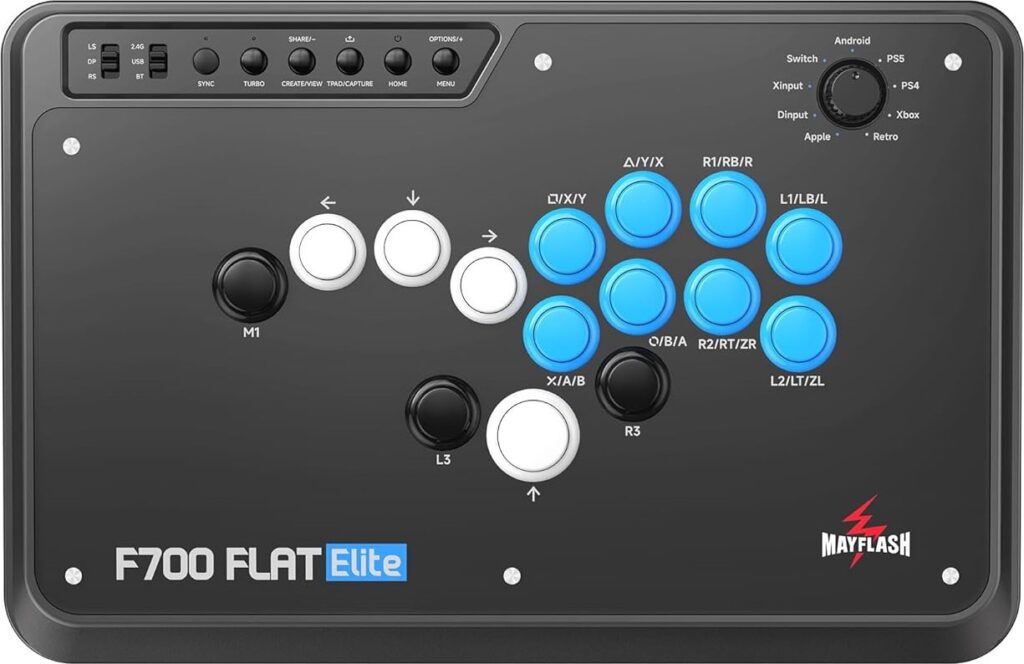
The Mayflash F700 FLAT Elite is a 15 button controller that can last up to 20 hours per charge. You can go for these connection methods:
- Bluetooth
- 2.4 GHz
- Wired
The F700 FLAT Elite’s left side has a hinged door that unveils a wireless receiver, which is where you can also find the USB cable. You can switch between consoles with ease using the knob on the top panel. On the front panel, there’s a headphone jack—in addition to a microphone mute button.
The art of the F700 FLAT Elite is customizable, and there’s a clear acrylic panel for it. Here are the needed steps:
- Remove the controller’s cover.
- Slide your art print under.
- Put on the cover again.
The Arcade Stick can print your art if you like. Other than that, the F700 FLAT Elite’s star feature is actually its Sanwa buttons that have an optimal travel distance, so you don’t need to apply too much pressure to press them.
Compared to its predecessor, the F700 FLAT Elite is wider, making it comfier on your lap. The decent weight means it shouldn’t slide around, especially because of the anti-slip bottom pad.
Why to Buy
If you’ve been using fightsticks since 2009, you’ll probably adore how the F700 FLAT Elite uses arcade-style buttons.
Where to Buy
Buy now on Amazon
8. Novablade Pro

The Novablade Pro is the result of a legendary keyboard maker, CORSAIR, making a leverless controller. Essentially, this controller’s buttons are CORSAIR keycaps.
Starting off strong, the Novablade Pro also has two extra thumb buttons: one for your left thumb and one for your right thumb. Moreover, the Rapid Trigger feature allows its buttons to reset right after 0.1 mm.
Essentially, you can adjust each of the Novablade Pro’s buttons’ actuation points in 0.1 mm increments—up to 4 mm. Not only that, CORSAIR’s FlashTap tech cleans up simultaneous opposing cardinal directions.
Onward, the Novablade Pro’s switches are CORSAIR’s as well. These MGX Hyperdrive switches are magnetic and sport the Hall effect. These switches are lubricated—with a double-rail design that should last you 150 million presses!
As a whole, the Novablade Pro is slim and sized well for either desk or lap play—with both surfaces benefiting from a full non-slip base. Having said that, you can connect the controller via one of the following options:
- Braided cable
- Bluetooth
- 2.4 GHz
The wireless option works great, and what also works well is the dynamic 360° RGB LightEdge that can illuminate the Novablade Pro’s sides—plus button LEDs. In closing, the top plate is magnetic, so it’s easy to remove. We can even print art for you to apply there.
Why to Buy
The Novablade Pro is a feature-rich controller—from a Rapid Trigger feature that adjusts button actuation to having left and right thumb buttons.
Where to Buy
Buy now on Amazon
9. Razer Kitsune
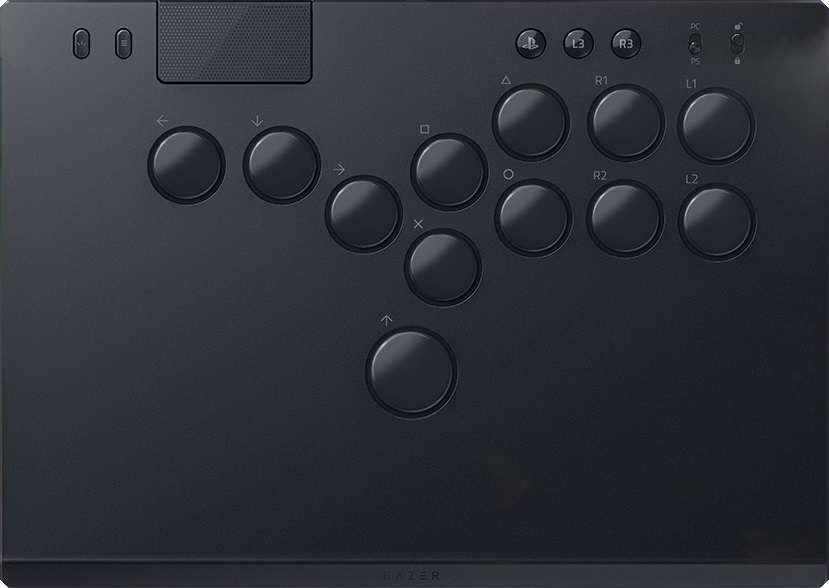
Justin Wong is one of the professional players who provided feedback during the development of the Razer Kitsune. Its low profile Razer linear optical switches have a shorter actuation height—and fast response time.
The Kitsune is a lightweight & mid-sized controller, and its thinness is reminiscent of a tablet. It has ample space for your wrists to rest, and its slimness spares you from tilting up your wrists.
Moving on, the anti-slip pad at the Kitsune’s bottom gives you stability. Not just that, the braided cable is detachable, and its port is lockable.
In addition to the black edition, the Kitsune is also offered in:
- Cammy edition
- Chun-Li edition
- Other editions
Because the Kitsune has an aluminum top panel, you can apply vinyl art to it, which we can print. Simply put, the controller is an elegant beauty. It’s powered by Razer Chroma RGB, and the light subtly shines through its sides.
Why to Buy
If you only need 12 buttons, and if you like the idea of optical switches, then the Kitsune is worth a buy for you.
Where to Buy
Buy now on Amazon
10. Varmilo HA10

Now that the Varmilo Kassai has been released for a while, it makes sense that Varmilo eventually came up with the HA10—a leverless version of it.
Before we dive deeper, let’s mention what comes with the HA10:
- Three to four blank buttons
- Three spare buttons
- Two button removers
- Two gloves
- Strap
In essence, the HA10 has 18 main buttons, but if 18 buttons are too many for you, you can replace an unwanted button with a blank button. Button mapping is made easier with the Varmilo Web Driver companion software.
The HA10’s buttons are quieter than average. These buttons are enforced by hot swappable Cherry MX Silver switches that have a customizable actuation point—in Hall effect fashion.
Although weighty, the moderately sized HA10 is made of CNC metal, and traveling with the controller is made easier with the shoulder strap.
The black cable color nicely matches the buttons—regardless of which color you order the HA10 in. By the way, the planetary button art is optional.
Why to Buy
The HA10 has 18 buttons, but you can replace some of them with blank buttons if needed. Other than that, you may be especially fond of the right palm button. You can also customize the switches’ actuation point, which is a rare feature. You might find the gloves and shoulder strap to be especially convenient as well.
Where to Buy
Buy now on AliExpress or Amazon