
To shop all of these arcade sticks in one place directly on Amazon, click here.
1. Haute42 C16
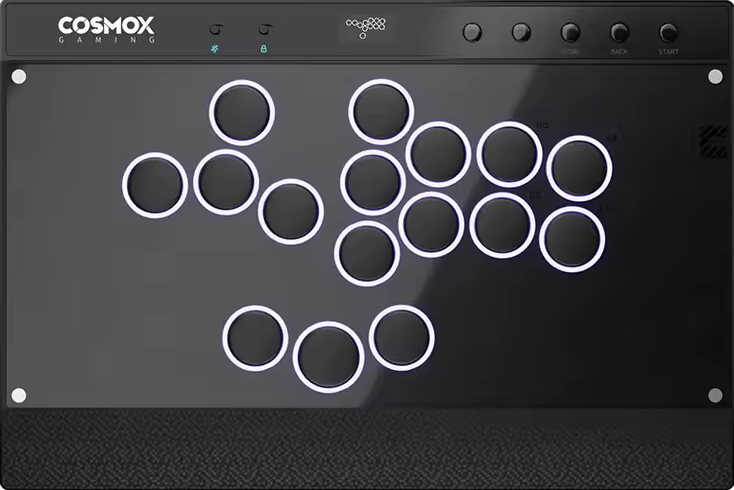
The Haute42 C16 ticks the below checkboxes:
- It has 16 buttons.
- It has a sloped wrist rest.
- It has an informative screen.
- It has a lot of function buttons.
If the C16’s switches aren’t your preferred style, they’re hot swappable, so you can install other switches. That said, this slim controller is wide enough to place on the lap.
Needless to say, the C16 has a screen, and it’s awesome to see it in the center instead of to the side. On the screen, you can see details like:
- SOCD cleaning mode
- Directional mode
- Input mode
- Button presses
In essence, the C16 runs on the popular GP2040-CE firmware known for its:
- Open source design
- Decent compatibility
- Web configuration
- Online updates
- Almost zero latency
More than that, there’s an EXT port to extend the C16’s compatibility. Additionally, RGB LED can make the controller light up nicely. Even the artwork is customizable, and for this, we at The Arcade Stick have an art service for you.
Why to Buy
The C16 has a right index button, and it has two thumb buttons horizontally aligned—keeping your thumbs positioned in a symmetrical way.
Where to Buy
Buy now on AliExpress or Amazon
2. Haute42 C-AT

Given the C16’s success, Haute42 launched the C-AT, which is its first try at a controller with 18 buttons. In fact, the primary buttons allow you to adjust their travel distance:
- The long level is 0.3 mm.
- The medium level is 0.6 mm.
- The short level is 1.0 mm.
The six extra buttons give the C-AT more than one layout, such as a split layout that gives your hands more breathing room. The buttons generally have a dry texture to them, and they use the snappy Wind Engine switches that trigger quickly—whereas the tactile, clicky, and hot swappable switches have a fully POM housing & stem in a way that reduces friction, resulting in smooth keystrokes.
It’s sick that the C-AT’s grip pad covers the bottom panel almost fully. It’s to be appreciated how the cable is braided as well. What’s also rad is how the USB-C port in the back center is the lockable variant. There’s also another USB-C port on the left. Third, there’s a USB-A port where you can insert an adapter to extend the controller’s compatibility.
That said, you can buy a C-AT in black or white, and you can also paste a wrist rest sticker with art. Some variations:
- Fireball-tossing character
- Geometric shapes
- Something else
Otherwise, just like how the C-AT’s wrist rest is magnetically detachable, you can also magnetically lift up the top panel by pressing one button. This way, you can place art that represents you, which we can print. Finally, the C-AT’s buttons can benefit from LED that lights them up in a visually appealing way.
Why to Buy
With the C-AT, Haute42 improved things—like giving you the freedom to adjust the button travel distance—and the 18 buttons give you more than one layout, which can give you a competitive advantage.
Where to Buy
Buy now on AliExpress: Standard / Metal
Buy now on Amazon: White / Black
3. Haute42 M Ultra Gen2

After the M16 Ultra’s impressive sales, the award winning Haute42 made a sequel called the M Ultra Gen2. This controller’s main improvement over its predecessor is including a left pinky button, whereas the two buttons surrounding the jump button are lined up horizontally.
That being said, the M Ultra Gen2 features the swift Shadow Hunting low profile switches, yet if you prefer other switches, you can just hot swap the default switches.
Having said that, the M Ultra Gen2 is an aluminum alloy controller that’s hefty enough to be stable without being too cumbersome. It has a slope for your wrists too, and the bottom has a grip pad per leg. About the controller’s slimness and size: they make it fit into some laptop sleeves.
Onward, the M Ultra Gen2 runs on the acclaimed GP2040-CE firmware. More than that, there’s a screen to display:
- Input mode
- SOCD mode
- Directional mode
- Button press animation
(You can insert a converter into the M Ultra Gen2’s USB-A port to make it further compatible with consoles.)
Color-wise, your M Ultra Gen2 can be black or blue—and with tasteful accents. Lastly, you have LED that brings the controller to life, and if you’d like to add art to the controller, we’d be glad to print that art.
Why to Buy
The M Ultra Gen2’s aluminum alloy is not too common, and it has a left pinky button—with extra thumb buttons aligned in a horizontally straight way.
Where to Buy
Buy now on AliExpress or Amazon
4. Qanba Sapphire

The Qanba Sapphire has 18 Qanba Gravity buttons, and the leftmost button is dedicated to your left pinky. That said, the Cherry MX Speed Silver switches are hot swappable, but if you stick to these standard profile switches, you may be happy to know that these switches are:
- Linear
- Fast
- Quiet
- Smooth
- Durable
The Sapphire is a thinner controller, and it has a detachable memory foam slope where you can rest your hands. If you remove this foam slope, you can find items like an adjuster—to then rotate this adjuster on the desired button and choose from the following travel distances:
- Long
- Medium
- Short
On the Sapphire’s screen, you can see your chosen button mapping configuration, and there’s a toggle to cycle through any saved button mapping configuration files.
Another cool feature of the Sapphire is that the rubber pad covers the whole bottom. Additionally, the USB-C cable is detachable from its hinged compartment that has a locking mechanism, making travel easier (especially if you use the included shoulder strap). You can also find a headset jack in the controller’s back to focus.
One style choice you can make is either a colorful foam slope or just a black flat panel for wrist resting. As for the Sapphire’s glow button, it’s there to control the lights that can glow through the buttons and sides. If you’d like your controller to stand out more, consider customizing its art, which we can print.
Why to Buy
With 18 buttons, the Sapphire has more buttons than many competitors—yet you can still cover unneeded buttons.
Where to Buy
Buy now on AliExpress or Amazon
5. 8BitDo Arcade Controller

After the 8BitDo Arcade Stick’s success, 8BitDo released the 8BitDo Arcade Controller, which is slimmer, so it’s likelier to fit into a tablet sleeve you already have.
Compared to most 16 button controllers, the 8BitDo Arcade Controller does something different. The extra buttons are bean-shaped and ergonomically slanted. This shape gives you increased surface area to press the buttons without the need for full precision.
The 8BitDo Arcade Controller’s extra buttons are remappable. Don’t need such extra buttons? You can just replace them with the button lock caps included. By the way, the controller supports the 8BitDo Ultimate Software for:
- Macros
- Updates
- More features
That aside, the 8BitDo Arcade Controller’s buttons use Kailh Wizard low profile switches, which are hot swappable, so if you don’t like tactile, light, and smooth switches: you can easily take out the switches.
The 8BitDo Arcade Controller’s top consists of tempered glass, whereas the bottom has a silicone anti-slip mat to prevent the controller from sliding around. Also, the foldable feet allow you to pick from two angles.
Another way the 8BitDo Arcade Controller makes life easier is by connecting by way of:
- Bluetooth
- 2.4G
- Wired
The battery takes only three hours to charge and can last up to 20 hours, but let’s wrap up with some aesthetics talk: the 8BitDo Arcade Controller can light up through several RGB LED modes. Finally, we can print art for this controller.
Why to Buy
You’re recommended the 8BitDo Arcade Controller if you want a wireless controller with some bean-shaped buttons that give you more surface area when pressing.
Where to Buy
Buy now on AliExpress: Switch / Xbox
Buy now on Amazon: Switch / Xbox
6. Varmilo HA10

Now that the Varmilo Kassai has been released for some time, it’s sensical that Varmilo eventually came up with the HA10—a leverless version of it.
Before we move on, this is what comes with the HA10:
- Three to four blank buttons
- Three spare buttons
- Two button removers
- Two gloves
- Strap
Fundamentally, the HA10 has 18 primary buttons, but if 18 buttons are too many for your needs, you can replace an undesired button with a blank button. Button mapping is easy with the Varmilo Web Driver companion software.
The HA10’s buttons are the quieter kind, and they use hot swappable Cherry MX Silver switches that have a customizable actuation point.
Though weighty, the moderately sized HA10 is metallic, and traveling with it is made easier with the shoulder strap. The black cable color matches the buttons well—regardless of which color you order the controller in—and the planetary button art is optional.
Why to Buy
The HA10 has 18 primary buttons, but you can replace some with blank buttons. Otherwise, you might like the right palm button. You can customize the switches’ actuation point as well. You might find the gloves and shoulder strap convenient too.
Where to Buy
Buy now on AliExpress or Amazon
7. FightBox F-Pro
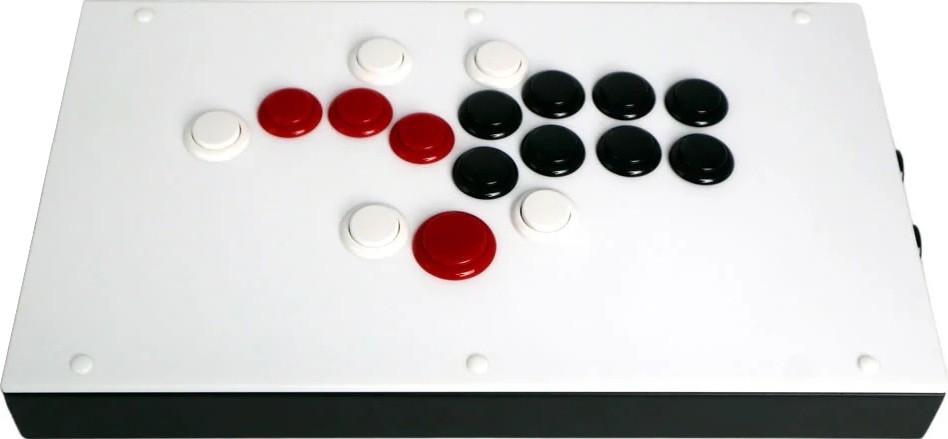
The FightBox F series is a pioneer of leverless controllers that have premium Sanwa buttons—with a lightweight press and satisfying sound. This series has many editions with various layouts available, yet the F-Pro can be considered the final boss of this series—given how it has 17 main buttons.
That said, the 17 button layout puts your following fingers to use—to press the F-Pro’s five extra buttons:
- Right index finger
- Right thumb
- Left thumb
- Left pinky
- Left middle finger
With that, the F-Pro’s case material is metal that feels good. There are not four but six feet at the bottom, which are stable enough not to make the controller slide during play.
Aesthetically, the white, black, and red combo works nicely for the F-Pro, but you can choose a primarily black edition as well. If you go for the clear acrylic edition and would like custom art, we can print the design for you.
Why to Buy
The multiplatform F-Pro with 17 Sanwa buttons on a wide metallic case is simply overpowered.
Where to Buy
Buy now on AliExpress or Amazon
Buy now on FightBoxArcade
(10% code: THEARCADESTICK)
8. Novablade Pro

The Novablade Pro is the leverless creation of a veteran maker of keyboards, CORSAIR. The controller’s buttons are CORSAIR keycaps too.
For starters, the Novablade Pro also has two extra thumb buttons: one for your left thumb and one for your right thumb. Further, the Rapid Trigger feature allows its buttons to reset right after 0.1 mm.
You can adjust each of the Novablade Pro’s buttons’ actuation points in 0.1 mm increments—up to 4 mm. Not only that, CORSAIR’s FlashTap tech takes care of simultaneous opposing cardinal directions for you.
Onward, the Novablade Pro’s switches are CORSAIR switches too. These MGX Hyperdrive switches are magnetic and sport the Hall effect.
With that said, the Novablade Pro is slim and sized well for desk and lap play—with both surfaces benefiting from a full non-slip base. You can also connect the controller via one of the following methods:
- Braided cable
- Bluetooth
- 2.4 GHz
What works well too is the dynamic 360° RGB LightEdge that can illuminate the Novablade Pro’s sides—plus button LEDs. The top plate being magnetic makes it’s easy to remove, and we can even print art for you to apply there.
Why to Buy
The Novablade Pro is a feature-rich controller—from a Rapid Trigger feature that adjusts button actuation all the way to including left and right thumb buttons.
Where to Buy
Buy now on Amazon
9. GuileKeys GK-21
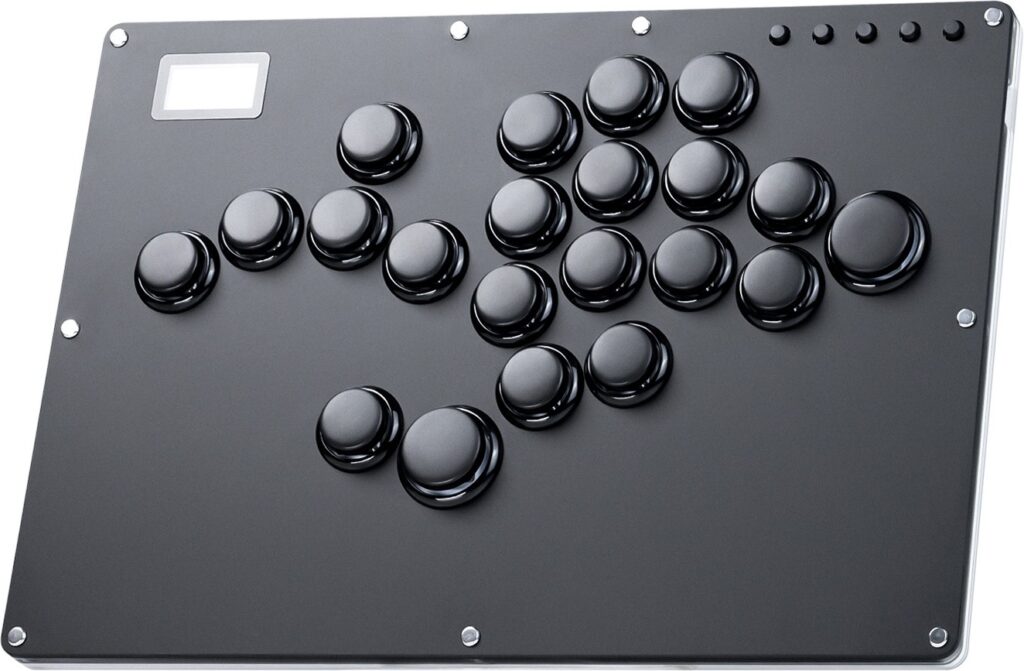
The GK-21 is an acrylic controller with 21 primary buttons, so you can use the directional buttons with your left and right hands in unison, but if you do not need 21 buttons, the GK-16 edition has 16 buttons. The buttons are rimmed.
Regarding the RGB button, it refers to the LED that the GK-21 has, which glows around the buttons and through the midsection attractively.
When it comes to the GK-21’s switches, they are hot swappable Kailh Choc Reds, so if you have another preference, you can just change the switches.
Continuing on, you can find a screen that lets you know valuable intel to boost your GK-21 experience. For instance, you can watch your button presses, and you can also check the current SOCD cleaning mode.
About the connectivity, the GK-21 lets you pick from a USB-C port in the back and another on the left side. Compatibility-wise, the RP2040 chip runs on the open source GP2040-CE firmware with negligible input delay.
If you plan to play on more consoles than the GK-21 supports, there is a USB-A port to extend the controller’s compatibility through an adapter.
Why to Buy
With 21 buttons, the GK-21 is the final boss of controllers with many buttons, so whatever your game’s requirements are, this controller should be able to meet them.
Where to Buy
Buy now on Amazon
10. NLOFIN NLHX-ET01

16 button controllers with metal hardware are rare, and such is the case with the NLOFIN NLHX-ET01. This slim controller is made of aluminum alloy & acrylic, and its size is good for both wrist resting & lap placement. You can actually pick the metal’s color, such as:
- Silver
- White
- Black
- Yellow
You can pick the backlight and button color too. Speaking of the NLHX-ET01’s buttons, they’re infused with Gateron Red linear switches with no tactile bump or click. Don’t like these switches? No worries, you can just hot swap them.
In any case, the NLHX-ET01 does have sound-insulating cotton so that your nearby opponent doesn’t hear your every press. That said, this controller is recommended if you like to use these fingers to press its four extra buttons:
- Left middle finger
- Left thumb
- Right thumb
- Right index finger
The NLHX-ET01 is also a solid pick if you prefer function buttons to be near the attack button cluster. One of these function buttons is for turbo mode.
Regarding modes, the NLHX-ET01’s built-in screen gives you more information about which modes you’re in—as well as a live animation of your button presses.
With two USB-C ports, the NLHX-ET01 allows you to pick your most convenient location to insert its cable, whereas the USB-A port lets you insert your own dongle to extend the controller’s compatibility.
Why to Buy
The NLHX-ET01 is a durability monster, thanks to its metal hardware and ability to have its compatibility extended.
Where to Buy
Buy now on Amazon
To shop all of these arcade sticks in one place directly on Amazon, click here.