
To shop some of these controllers in one place directly on Amazon, click here.
1. Haute42 R16
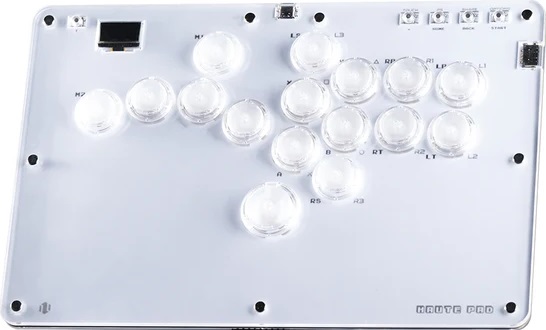
The Haute42 R16 contains 16 buttons—with a button for your left pinky—and the Kailh Crystal low profile switches allow you to press the buttons in rapid succession.
The R16’s screen displays details that range from your inputs to the SOCD mode you’re in, whereas the USB port conveniently comes out of the back center. There’s an additional USB port where you can insert a dongle to make the controller compatible with more consoles.
By the way, you can get the R16 in a black color too, and what you can also get can include:
- Couple of function buttons
- Puller for switches
- Extra switch
In closing, the R16 is a beauty, especially due to the LED that can activate when you press its buttons. The controller can also accept custom art to make it reflect your tastes in life. Yes, we print such art too!
Why to Buy
The R16 is acrylic—and has a left pinky button instead of a left thumb button.
Where to Buy
Buy now on AliExpress or Amazon
2. Haute42 T16
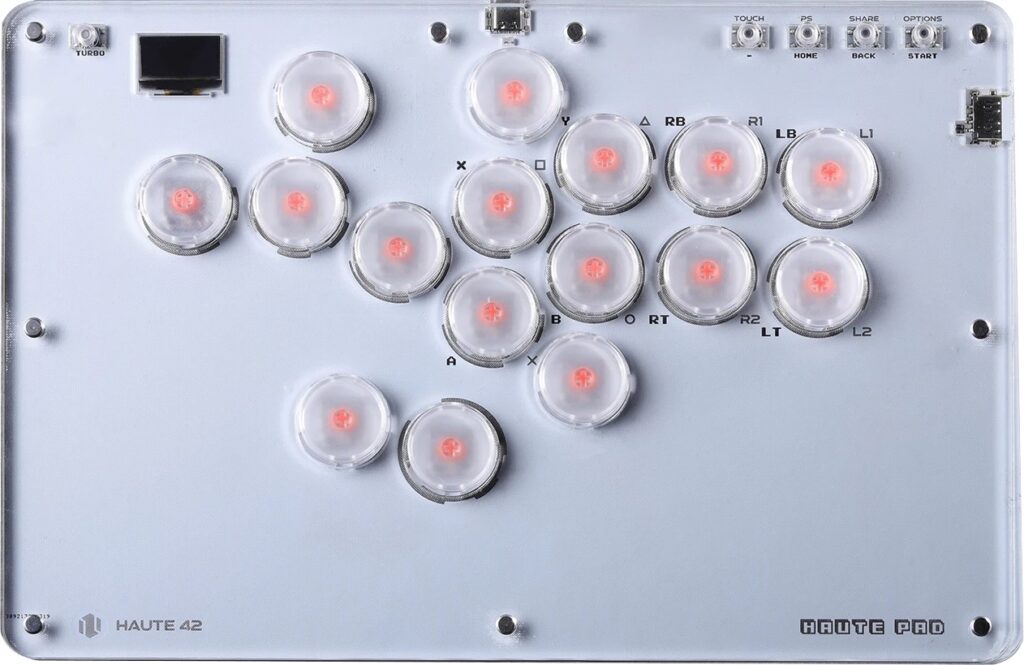
The Haute42 T16 is a controller with bigger buttons—plus Kailh Choc low profile switches for faster pressing. You can order this controller with less buttons if that’s what’s needed.
That said, the T16 is an acrylic controller with chamfered edges, and there are non-slip feet to make the controller stay in place during a gaming sesh. Also, the USB port is conveniently located in the back center, whereas there’s another port into which you can insert an adapter to make the controller compatible with additional consoles.
With that, the T16’s screen lets you know such information:
- Input mode
- Directional mode
- SOCD cleaning mode
You may also be delighted to know that the T16’s artwork is customizable, so you can have your favorite characters displayed on it. We print such art too, by the way, and we did also want to let you know that the LED makes the controller even prettier when you press its buttons.
Why to Buy
Since it has all big buttons, the T16 is most recommended if you’ve got larger hands.
Where to Buy
Buy now on AliExpress or Amazon
3. 8BitDo Arcade Controller

After the 8BitDo Arcade Stick’s success, 8BitDo released the 8BitDo Arcade Controller, which is thinner, so it’s likelier to fit into a tablet sleeve you already have.
Compared to many controllers, the 8BitDo Arcade Controller does something different. The extra buttons are bean-shaped and slanted. The shape gives you more surface area to press the buttons without needing full precision.
The 8BitDo Arcade Controller’s extra buttons are remappable, but if you don’t need such extra buttons, you can just replace them with the button lock caps included. That said, the controller supports the 8BitDo Ultimate Software for:
- Macros
- Updates
- More features
Aside from that, the 8BitDo Arcade Controller’s buttons use Kailh Wizard low profile switches, which are hot swappable, so if you don’t like tactile, light, and smooth switches: you can easily take out the switches.
The 8BitDo Arcade Controller’s top consists of tempered glass, whereas the bottom has a silicone mat to prevent the controller from sliding around. Also, the foldable feet allow you to pick from a couple of angles.
Another way the 8BitDo Arcade Controller makes life easier is by connecting in these ways:
- Bluetooth
- 2.4G
- Wired
The 8BitDo Arcade Controller’s battery takes only three hours to charge and can last up to 20 hours, but let’s wrap up with some aesthetics talk: the controller can light up through several RGB LED modes. If needed, we can print custom art for this controller too.
Why to Buy
You’re recommended the 8BitDo Arcade Controller if you want a wireless controller with some bean-shaped buttons that give you more surface area.
Where to Buy
Buy now on AliExpress: Switch / Xbox
Buy now on Amazon: Switch / Xbox
4. DuelPad Zen
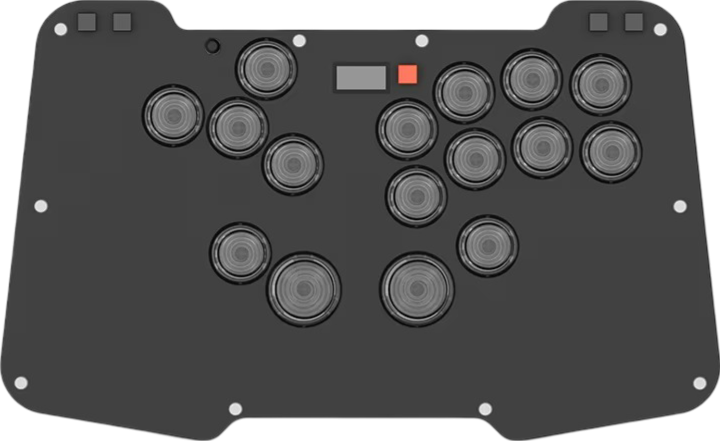
DuelPad calls the Zen’s layout an ergo-split layout, which is for reducing wrist discomfort. In essence, you would be tilting your wrists at a slight angle when using the controller, and the movement buttons are farther apart from the attack buttons than what you might be used to.
The Zen’s buttons are smooth, and they sound less loud than many buttons. Also, they should not come off if you perform advanced techniques like sliding or pianoing.
When you play, the Zen should not slip, even without the installation of the optional feet. The controller is light enough to carry without getting tired, but it has enough weight not to forget it is still in your hand.
The Zen is slim, but it passed a malleability test when deliberately pressing on the top panel. With that being said, the controller contains USB-C ports in the back and on the left.
There is a USB-A port where you can insert a dongle to make the Zen compatible with additional consoles. There is also a built-in screen that tells you important info like which buttons you pressed.
When it comes to looks, the Zen is an acrylic controller with matte black and crystal editions:
- Matte black edition: Ghost switches
- Crystal edition: White Rain switches
The Zen’s switches are low profile, linear, swift, and quiet, but if you have another preference, the switches can be hot swapped. The controller’s aesthetics can be beautified with RGB LED, and there are as many as 35 themes. One last tip: the controller accepts custom art, which we can print.
Why to Buy
The Zen’s ergo-split layout keeps your hands farther apart from each other in a way that gives you breathing room.
Where to Buy
Buy now on AliExpress
5. DuelPad A16
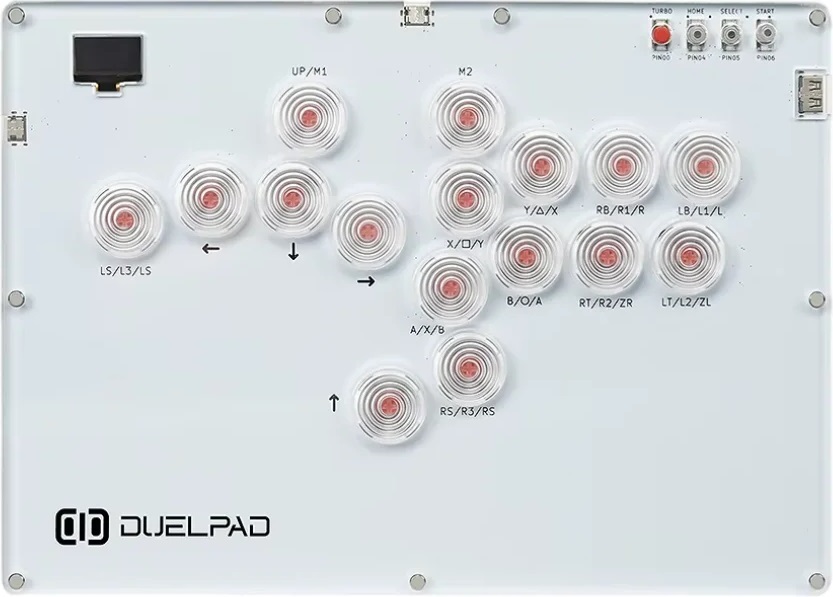
Perhaps the DuelPad A16’s best feature is its left pinky button. With dozens of LED patterns—the buttons come to life even more. Otherwise, this controller comes in multiple editions:
- EPIG edition: Kailh Choc V1 switches
- Cross edition: Kailh Choc V2 switches
- Both editions: 16 or 14 buttons
If you wish, you can have a combination of EPIG and Cross buttons throughout your A16. Back to the A16’s switches: they are the low profile Kailh Choc Reds that can be described as light, smooth, and quieter than average.
The A16’s onboard screen shows you valuable information like your:
- Input mode
- Directional mode
- SOCD cleaning mode
- Input animation in real time
Running on the popular GP2040-CE firmware, the A16 supports web configuration, so you are able to conveniently adjust the controller’s settings. You can extend this controller’s compatibility further if you have a converter.
That said, the A16’s design prevents it from sliding while you are gaming. Also, the size of the controller is appropriate for both desks and laps.
In addition, the A16 has plenty of space for your wrists to rest. It goes without saying that this controller is quite thin, but despite being thin, the controller still feels robust—not flimsy.
Now, you may be interested in enhancing your A16’s stability, which you can do by attaching the rubber feet that come with the controller. Also, there are a couple of aluminum stands you can add to make the controller more angled—much like a keyboard.
Your A16 may also come with custom artwork you can easily apply by unscrewing the top, placing the print, and then screwing the top back on.
Why to Buy
You can choose which of the A16’s buttons are EPIG and which of the buttons are Cross. You can also tilt the controller to the most comfortable angle for you.
Where to Buy
Buy now on Amazon
6. GuileKeys GK-21
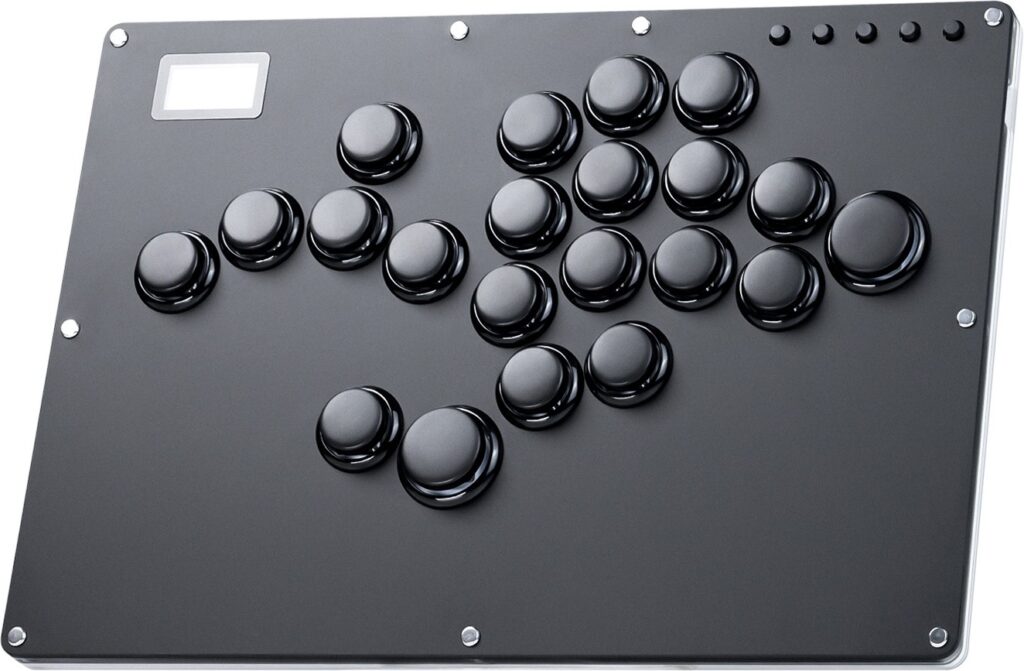
The GK-21 is an acrylic controller with 21 rimmed buttons, so you can use the directional buttons with your left and right hands in unison, but if you do not need 21 buttons, the GK-16 edition has 16 buttons.
Regarding the RGB button, it refers to the LED that the GK-21 has, which glows around the buttons and through the midsection. When it comes to the switches, they are hot swappable Kailh Choc Reds, so if you have another preference, you can just change the switches.
Continuing on, you can find a screen that lets you know valuable info to boost your GK-21 experience. For instance, you can watch your button presses, and you can also check the current SOCD mode.
About connectivity, the GK-21 lets you pick from a USB-C port in the back and another on the left side. Compatibility-wise, the RP2040 chip runs on the open source GP2040-CE firmware with negligible input latency.
If you plan to play on more consoles than the GK-21 supports, there is a USB-A port to extend the controller’s compatibility through a converter.
Why to Buy
With 21 buttons, the GK-21 is the head honcho of controllers with many buttons, so whatever your game’s requirements are, this controller should be able to meet them.
Where to Buy
Buy now on Amazon
7. GuileKeys GM-16

In addition to its buttons being rimmed, something rare about the GM-16’s layout is that it features 21 mm buttons with a 26 mm jump button.
That said, the GM-16’s Kailh Saker Mini switches have:
- 37 gf actuation force
- 0.8 mm actuation point
- 1.8 mm total travel
In other words, these switches are fast. Moreover, the GM-16’s switches sound moderate, and they’re also hot swappable with MX-style switches for your convenience.
As for the GM-16’s screen, it shows you valuable information from (1) which mode you’re in to (2) a live animation of your button presses. You can even save your own profiles.
Having said that, the GM-16 has more than one USB port:
- Left USB-C port
- Back USB-C port
- Back USB-A port
The USB-A port is specifically to insert a dongle you own that can make the GM-16 compatible with additional consoles. You see, this controller runs on the popular RP2040 chip and open source GP2040-CE firmware combo.
The GM-16’s looks can be enhanced by RGB LED glowing around the buttons and through the controller’s sides. Although the acrylic panel has several fasteners, it’s actually magnetic, and you can simply remove it with the included suction cup. This way, you can customize the art.
Before you leave, you may be glad to know that the GM-16 arrives with many freebies like (but not only):
- Two blank art sheets
- Four preset art sheets
Why to Buy
The GM-16’s buttons are rimmed and smaller than usual. Not only that, the acrylic panel is removable magnetically. If you also like having a slim, light, and multiplatform controller with 16 buttons, then we encourage you to add this controller to your cart.
Where to Buy
Buy now on Amazon
8. GuileKeys GF-16
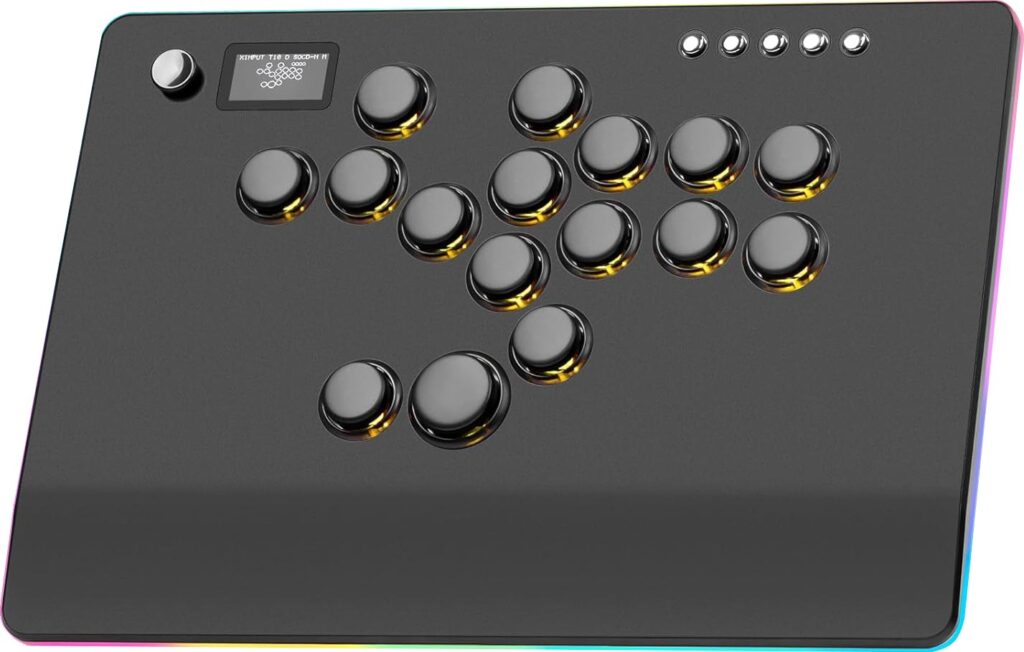
The GF-16 is an aluminum alloy controller with 16 primary buttons for modern fighting game mechanics. The buttons have rims. With this controller, GuileKeys strived to ensure that the buttons are quiet. The Kailh Choc Red switches are:
- Quiet
- Low profile
- Hot swappable
Moving on, you can find a screen on the slim GF-16’s top panel that tells you valuable information to boost your gaming experience, such as by seeing your button presses live.
The GF-16 lets you pick from two USB-C ports: one in the back left and another one on the left. The controller has an RP2040 chip, and it runs on the open source GP2040-CE firmware known for its negligible input delay.
If you plan to play on more consoles than the GF-16 supports, there’s a USB-A port in the back to enhance the controller’s compatibility through a dongle.
Finally, the GF-16 is the quintessential elegant controller, with its black color providing an aesthetic backdrop for the RGB LED that shines through the buttons and midsection.
Why to Buy
The GF-16 boasts many solid features, such as being made of aluminum alloy, using rimmed buttons, featuring two USB-C ports, and having extendable compatibility.
Where to Buy
Buy now on Amazon
9. Mayflash F500 FLAT
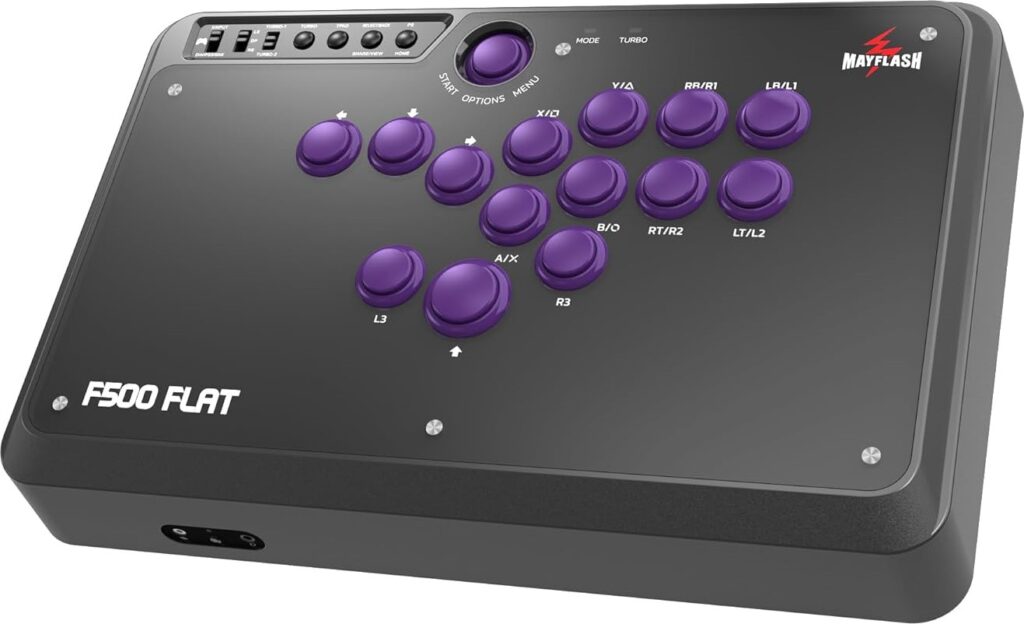
The Mayflash F500 FLAT is a leverless installment in the long running F500 series. The controller also has L3 and R3 buttons as action buttons. The start button being recessed makes it harder to press accidentally too.
The F500 FLAT’s width makes it comfortable for both lap and desk play. Plus, the controller is big enough with plenty of wrist space. Not only that, the four rubber feet at the bottom enhance stability.
Moving on, the F500 FLAT is not too heavy to carry. Its metallic enclosure and base increase security overall. Moreover, there’s a headphone port.
Next to that port is another port for a rumble wrist strap. There’s a USB-A port to insert a converter for extended compatibility with more consoles as well.
Otherwise, the cable comes out of a compartment on the left, and the F500 FLAT also comes with:
- USB-C cable
- OTG USB cable
- Micro USB cable
If needed, the buttons are easy to replace because of the easily visible bottom screws. Sanwa buttons are compatible too. Furthermore, the F500 FLAT’s interior is color coded and neat. There’s a clear acrylic panel, you can get custom art to make the controller a mirror image of yourself, and we can print the art for you.
Why to Buy
If 16 buttons are too much for you, then the F500 FLAT’s 14 buttons are just enough for many modern fighting games, and they’re compatible with Sanwa buttons.
Where to Buy
Buy now on Amazon
10. Powkiddy A50
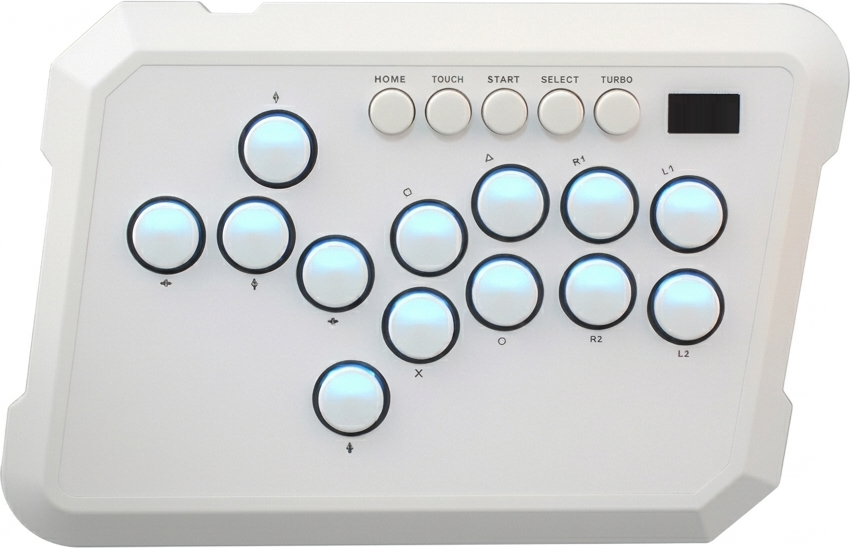
The Powkiddy A50’s buttons can last you 50 million presses, and its switches are hot swappable. These switches can be described as sharp, tactile, and clicky.
Fundamentally, the A50 is a light and fairly slim “dual shell” controller with chamfered edges for your wrists’ comfort. It also has a screen on top of it, which can show your:
- Input mode
- Turbo mode
- Directional mode
- SOCD cleaning mode
- Button press animation
At the A50’s bottom, you can see the PCB through a window located in the center. It’s also great that the controller has LEDs, so the buttons can glow nicely.
Why to Buy
The A50 is a uniquely shaped controller you can travel with lightly. Its function buttons are bigger than average, and its side grooves allow you to move it around more easily if needed.
Where to Buy
Buy now on Amazon
To shop some of these controllers in one place directly on Amazon, click here.