
1. HauteBox Zero

After making many bestselling leverless controllers, Haute42 decided to make an ergonomic controller: the HauteBox Zero. With 14 main buttons, the controller has four directional buttons on the left and 10 more buttons on the right.
Not only that, your favorite Wind Engine switches make a comeback for the Zero. These low profile switches are made of POM, and they’re quite snappy—triggering fast.
Furthermore, Wind Engine switches are minimally audible with no noticeable bump or click. More than that, the Zero’s switches are expected to last you 50 million presses.
In classic Haute42 fashion, the Zero runs on the open source GP2040-CE firmware that’s low in input latency. It’s got SOCD cleaning and the whole nine.
Made of metal yet still light, something interesting is that the Zero’s bottom is raised. In the back, you can find a couple of USB-C ports, and in the middle is a USB-A port. This way, you can insert a dongle into the USB-A port to make the controller compatible with additional modern consoles.
Why to Buy
The Zero is made of durable metal yet remains light. Also, its Wind Engine switches allow you to play quietly.
Where to Buy
Buy now from AliExpress
2. Vertibox
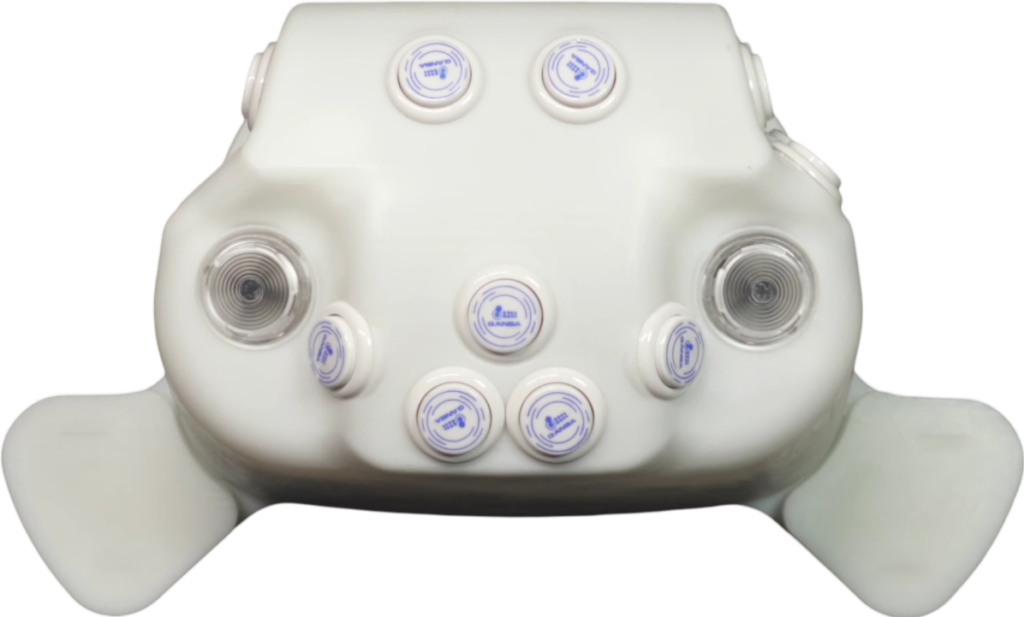
Instead of putting your wrists flatly on a controller’s top panel—and potentially pressuring your wrists—the Vertibox allows you to eliminate pronation by placing your hands in a vertical position that is more natural.
That said, the Vertibox uses Qanba buttons and Punk Workshop buttons plus Cherry MX RGB Speed Silver switches. These switches are linear, smooth, fast, and hot swappable.
Moving on, the PLA material of the Vertibox is of sufficient quality—thanks to the smooth 3D print. As for the wrist pads, you may be glad to know they’re removable.
Compatibility-wise, the Vertibox comes with a Pico board—meaning the firmware is the upgradable, low latency, open source, and critically acclaimed GP2040-CE, so SOCD cleaning modes are supported.
You see, the Vertibox has a USB-A port for modern console dongles. Other than that, the controller comes in colors that include black, blue, and purple—often with black buttons.
Why to Buy
The multicolored Vertibox uses Qanba buttons, Punk Workshop buttons, and Cherry MX switches. Also, its wrist pads are removable for your convenience.
Where to Buy
Buy now from Vertibox
3. BattleHut V16B
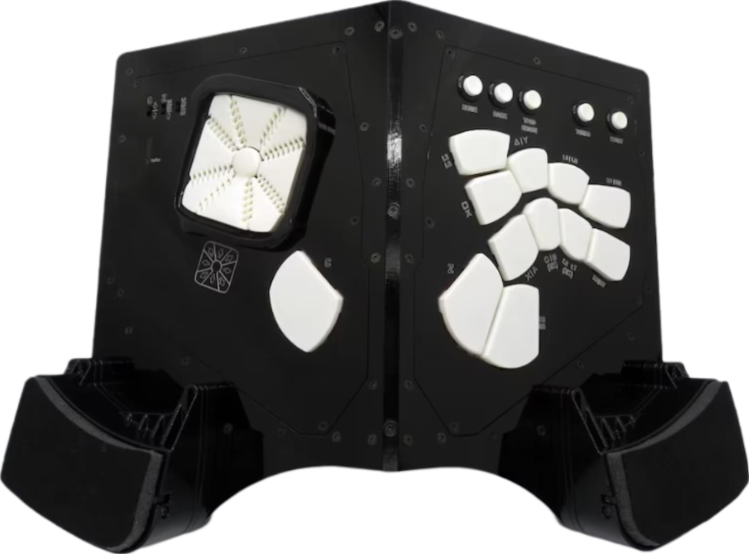
The BattleHut V16B’s button panels and wrist rests are slanted, relaxing your wrists into a comfortable position. Regarding the buttons, they’re bigger than your standard 30 mm buttons, but because the layout is more compact, your fingers should get less fatigued.
As for the V16B’s D-pad benefits:
- Easy finger sliding across the buttons
- Diagonal button access in eight directions
- Can set the left thumb button to up or down
- Makes the controller usable in WASD format
The V16B’s buttons (as well as its D-pad) have Sanwa microswitches with a guided linear motion—and just a couple of millimeters of travel.
Why to Buy
The V16B is ergonomic, big, and luxurious. Also, its Sanwa D-pad is tough to find elsewhere.
Where to Buy
Buy now from Etsy
4. LI.TERAS

Remember when Daigo used a GafroBox back in the day? Now, Gafro is offering a controller called the LI.TERAS. It brings back many of the GafroBox’s useful aspects—plus interchangeable modules.
The LI.TERAS is a modular controller, and its left & right sides are separate. Not just that, you can even enjoy a D-pad as well as some pad buttons—useful if you come from a console background.
The fact of the matter is the LI.TERAS uses Qanba D-lite buttons, which are the snap-in type, and they’re linear with little resistance. Further, they are fast and have minimal travel distance.
Visually, the LI.TERAS has quite a retro look—with a gray enclosure in addition to green, yellow, and blue parts. There are other enclosure colors like blue and khaki as well. You can even have the buttons in red too.
Why to Buy
The LI.TERAS has a modular design that lets you swap out its modules without being stuck with one layout forever.
Where to Buy
Buy now from Gafro
5. Bishop|Select Opal

The Bishop|Select Opal costs a fraction of its predecessor’s price while giving you the same ergonomic goodness. It feels mostly like a standard leverless controller, but the top panel’s left side is sloped—and so is the right one.
That said, the Opal has Sanwa buttons that have an optimal travel distance, springiness, and crisp sound—plus durability. Not only that, you have four button layouts to choose from that differ in how many buttons are on each side.
Structurally, the Opal is made of pinewood. The icing on the cake is the handle you can find on the right side, allowing you to easily carry the controller to the next tournament.
Connectivity-wise, the Opal runs on the acclaimed GP2040-CE open source firmware with benefits that include almost zero input lag and extendable compatibility if you have an appropriate dongle.
While the Opal’s buttons are black, the wood itself has colors that are reminiscent of some camo you can unlock for Call of Duty guns. Still, Bishop|Select allows you to pick a two color combo.
Why to Buy
The Opal should be familiar if you’ve used leverless controllers before but would like each side to be sloped. Another benefit is the convenient carrying handle.
Where to Buy
Buy now from Etsy
6. Bishop|Select Maestro

Simply put, the Bishop|Select Maestro’s ergonomics lie in how the directional button side slopes one way and the attack button side slopes in another direction.
The Maestro has 14 main buttons. The controller uses Crown SDB-202 MX buttons that vary in size: 24 and 30 mm. These relatively rare buttons utilize Cherry MX switches for that crisp, keyboard-like sensation.
By default, the Maestro runs on the open source GP2040-CE firmware with benefits that include almost nonexistent input delay—in addition to extendable compatibility through a converter.
The Maestro is made of some of the finest and most durable wood known to the human race: solid oak with a high grade stain and polyurethane finish.
Appearance-wise, the Maestro looks slick. We’re talking about different wood colors you can go for—as well as different button colors. Something else you might like is a branding engraved brass nameplate.
The icing on top is the brass carrying handle you can find on the right side, allowing you to easily carry the Maestro around your next tournament.
Why to Buy
The Maestro’s sloped sides make it ergonomic enough for you to consider, and its carrying handle is nifty. Plus, its Crown buttons aren’t that common.
Where to Buy
Buy now from Etsy
7. Mavercade KeebWarrior-S3

The Mavercade KeebWarrior is one of the most unusual fighting game controllers out there. You can adjust this ergonomic controller so it perfectly fits your lap, making it a great option to take to tournaments.
The KeebWarrior has enough hinges for maximum flexibility, but the hinges are still robust—with no significant rattle. As for the modules on the left side, they can range from leverless buttons to WASD keys, but because the controller is a modular controller, you’re not stuck with one style forever.
Onward, the KeebWarrior uses Kailh Choc V2 switches, and these switches are hot swappable without the need for tedious tools. What boosts the performance further is the open source and popular GP2040-CE firmware. In addition, you can extend the compatibility with more consoles by way of a converter.
Back to the KeebWarrior’s modules, they’re 3D printed, and the bottom plate is made of cold rolled steel that gives the controller heft. As for the magnetic backing, it can be attached to a phone holder for tilt play. Moreover, the controller’s color customization options are insane.
If you’re done with your KeebWarrior for the day, you can shut it almost as easily as you spread it out, and you can carry it with you back home easily.
Why to Buy
The KeebWarrior lets you put each side of it on each leg of yours to find the most optimal stance for you.
Where to Buy
Buy now from Mavercade
8. Yamacon

The Yamacon by Cider Workshop has a little rest for your left hand, whereas there’s a big rest for your right hand—plus the attack buttons being raised.
That said, here’s the Yamacon’s button size lineup:
- Seven 24 mm directional buttons
- Eight 20 mm attack buttons
- One 30 mm jump button
- Two oval thumb buttons
The Yamacon’s two oval buttons are actually on the inner sides of both hand rests and to be pressed by your thumbs. From left to right, the thumb buttons are for Street Fighter 6’s Drive Impact and Drive Parry respectively, but of course, this controller is suitable for other games as well.
In general, the Yamacon buttons’ actuation point is 0.5 mm, and the total stroke is 1 mm. This makes these 3D printed buttons some of the fastest to date, resulting in quicker reactions to your opponent’s moves.
Despite being relatively light, the Yamacon is comprised of metal. Need to extend the controller’s compatibility with additional modern consoles? Just insert an appropriate adapter, and you should be good to go.
Why to Buy
The Yamacon’s elevated attack-button cluster might be all the ergonomics you need.
Where to Buy
Buy now from BOOTH
9. Prism
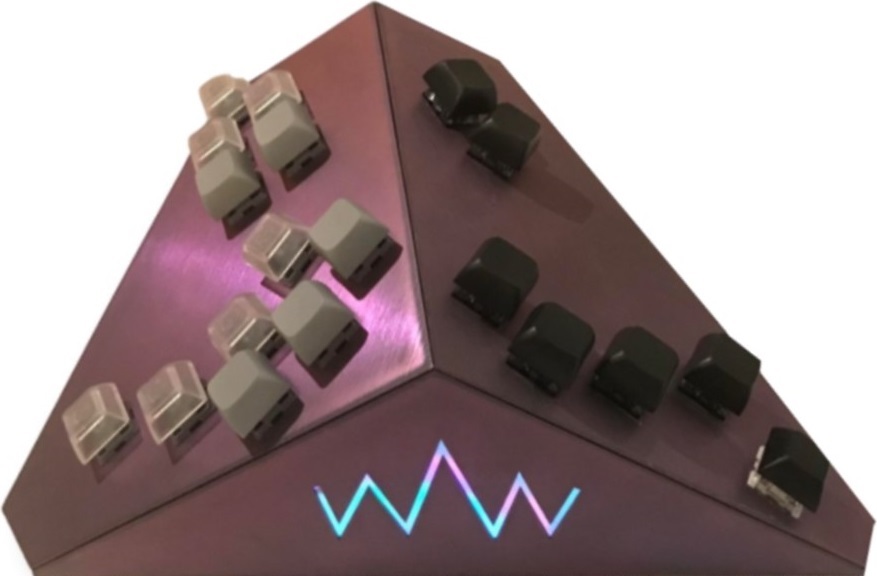
The Prism sports the Smash layout popularized by the likes of the Frame1 controller, with a reinterpretation that makes the action clusters rotated distally along the roll axis, inward on the yaw axis, and forward in pitch—all of which are to eliminate the need for forearm pronation & ulnar deviation.
With the Prism, the idle stance of your fingers can be in a naturally curled state, improving your reaction time. Moreover, the tighter distance between the keys allows you to use your whole thumb to trigger the five-button action cluster with minimum movement.
Regarding the Prism’s keycaps, they’re textured PBT XDA and DSA. As for the switches, the left side features Kailh Speed Silver switches with 4 mm O-rings, whereas the right side features Gateron Clear switches with 2 mm O-rings. The Clears are smoother than the Speed Silvers and feature a tactile bump.
The Prism’s enclosure is printed with a CR-6 Max, and it is made of laser-cut cast acrylic or aluminum bottom panels with a grip pad for stability purposes while placing the controller on the lap.
The 133 MHz ARM Cortex processor found in the Raspberry Pi Pico is featured to ensure the lowest latency in console and USB modes as well as the most diverse compatibility. The Prism has Kailh hot swap PCB sockets in addition.
The Prism looks elegant, and the many possible color combinations mean that your taste can be represented. For aesthetic purposes, you can add a front logo or tag as well as choose from different colors for the enclosure.
Why to Buy
The Prism combines hardware quality with a layout that’s community-driven and geared for Smash success.
Where to Buy
Buy now from Discord
10. The Schism
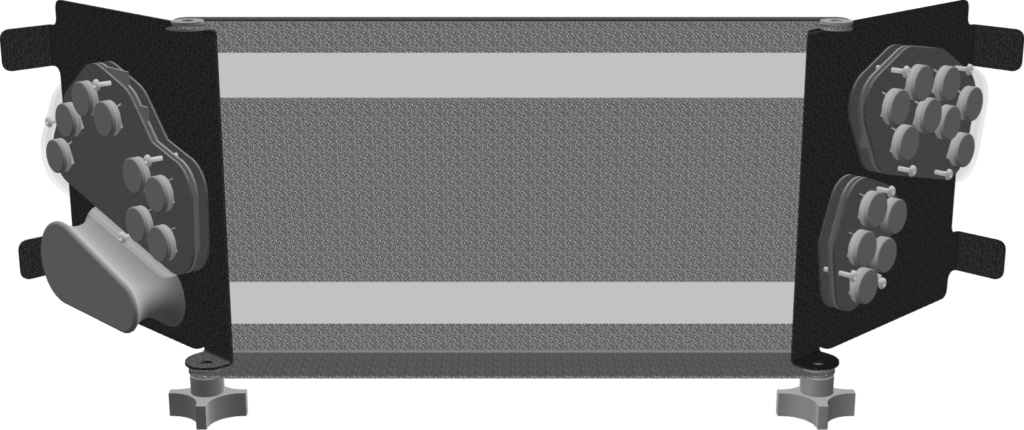
When done with a gaming session, you can simply fold The Schism to close it. This controller is for Super Smash Bros, and its layout is B0XX-based, but the locations, angles, and spacing of the right & left action clusters are adjusted.
Moving forward, The Schism is made of metal with stainless steel screws and nylon knobs & washers to protect your controller’s finish, which is available in different colors. The controller’s components include:
- Injection molded bjart keycaps
- Gateron Clear switches
- Raspberry Pi Pico
- Kailh hot swap PCB modules
- USB-C interconnected adjustable modules
- USB-C to GCC cable
If you like concave keycaps, then bjart keycaps are for you. As for the Gateron Clear switches, they’re linear, light, and smooth. Moreover, a third party adapter can enhance The Schism’s compatibility.
To add, you can make adjustments to The Schism on the fly because of the open frame design of its modules. Basically, each module is secured by magnets.
Why to Buy
The Schism is great in many ways for Smash players, but one of its main appeals is how you can fold it.
Where to Buy
Buy now from Discord