
| Price | AliExpress & Amazon |
| Release | Circa December 2025 |
| Compatibility | PS5 / PC |
| Dimensions | 11.8″ x 7.9″ x 2.2″ |
| Weight | 3.75 lbs |
Introduction
You may have some spare money to spend, and you may have asked yourself, “Is the HS-PS5260 worth my money?” Read along to find out the answer.
Unboxing
The HS-PS5260 comes in a primarily white box with some blue accents and so on. Your unit may arrive with just an instruction manual. Now, let’s move on.
Performance
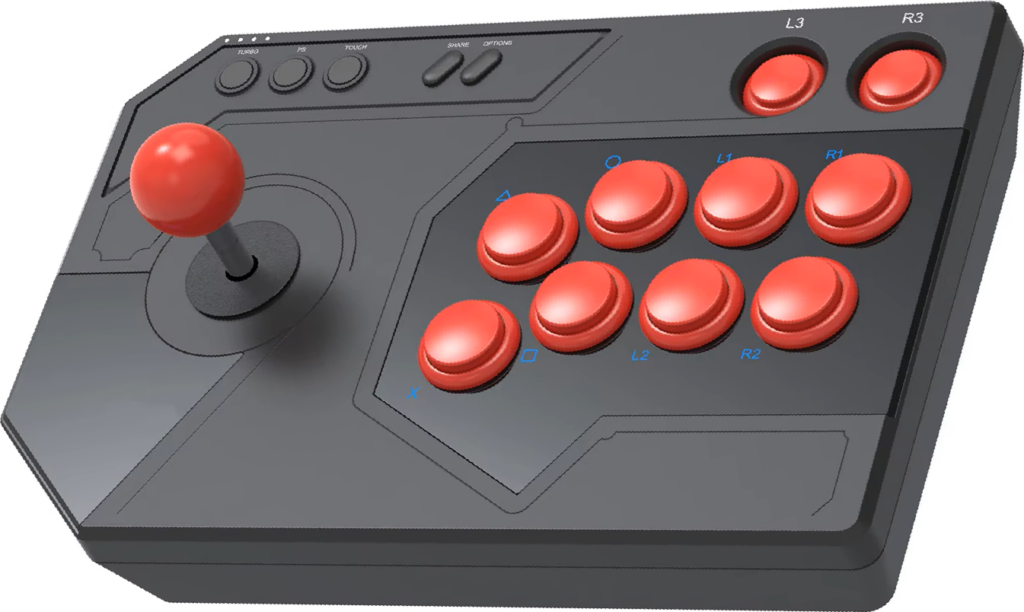
With respect to the octagonal joystick, the HS-PS5260’s large 30 mm buttons are positioned in the popular Vewlix layout. Remember that one Ed Sheeran song that goes, “I’m in love with the shape of you”? Well, we’ll tell you the shape and size of each of the aux buttons, but before we do that…
You may ask yourself where the HS-PS5260’s toggle for D-pad, left stick, and right stick inputs is. The kicker is that there’s no toggle, but you can instead do this (and be sure to hold for five seconds):
- D-pad (DP): press the options button and move the joystick down.
- Left stick (LS): press the options button and move the joystick left.
- Right stick (RS): press the options button and move the joystick right.
We’ll also tell you that the HS-PS5260’s turbo, PS, and touch aux buttons are flush with their surroundings in a way that’s reminiscent of Honson’s leverless HS-JOY200. So, without further ado:
| Aux Button | Shape | Size |
|---|---|---|
| Turbo | Circular | Small |
| PS | Circular | Small |
| Touch | Circular | Small |
| Share | Slanted pill | Tiny |
| Options | Slanted pill | Tiny |
| L3 | Circular | Big |
| R3 | Circular | Big |
Hardware
The HS-PS5260 is made of ABS: a quality type of plastic commonly used to make arcade sticks, leverless controllers, and so forth. At the bottom, there are four square anti-slip pads that are bigger than average.
The cable goes in the HS-PS5260’s back-right port that’s protective, and you should be able to connect to PC by way of XInput. Let’s end the hardware section by mentioning the arcade stick’s operating voltage and current:
| Spec | Value |
|---|---|
| Voltage | DC 5V |
| Current | <100 mA |
Appearance
If you look at the HS-PS5260 from a top-down view: it’s mostly rectangular, but on the left, you’ll see that the two corners there are slanted.
(That design element is stylish but may reduce wrist resting space. In fact, your palms may end up being the only parts of your hands truly resting on the HS-PS5260.)
That said, the HS-PS5260 ranges in shades of black if we’re talking about its panel’s geometric art. By the way, different art is an option for this arcade stick, and you can see some samples on Honson’s site (at the time of this writing).
With a red joystick & red buttons, the LED labels of the attack buttons (and Honson logo) are colored in blue, which is a questionable color because:
- Blue doesn’t fit the black-red color scheme.
- Blue is hard to see against black.
Having said that, let’s end the appearance section with the LED colors when you plug in your HS-PS5260:
| Element | LED Color |
|---|---|
| Honson logo | Blue |
| Attack button labels | Blue |
| L3 & R3 button labels | White |
| Indicator lights | White |
Conclusion
The HS-PS5260 is for the casual gamer who’d like to try an arcade stick or needs a backup. If you don’t need a huge wrist rest and prefer your L3 & R3 buttons big, check out this arcade stick.
- Octagonal joystick
- 30 mm Vewlix layout
- Big L3 & R3 buttons
- DP/LS/RS input modes
- ABS with geometric art
- Other art possible too
- Square anti-slip pads
- Protective cable port
- Turbo functionality
- Some aux buttons too flush
- Blue button labels not fitting