

| Price | Speedy Labs |
| Release | May 3, 2025 |
| Compatibility | NS2 / PC |
| Dimensions | 12″ x 9″ x 2″ |
| Weight | 2.81 lbs |
| Cable | 2 m |
Overview
We at The Arcade Stick were blown away by the quality of the LightFox, the first controller by Speedy Labs. So, it’s exciting that the open source SplitFox Pro is here. It offers similar value to the LightFox—plus more!
Also known as the Split Fighting Box Pro, the SplitFox Pro has 18 main buttons, which is more than usual—despite the fact that the controller is small. Furthermore, there are four buttons in the bottom row instead of the usual three.
Needless to say, the SplitFox Pro is a dual layout controller, so you can use it like a WASD controller as well. In fact, you can even request the controller to have actual WASD keys instead of WASD buttons.
That said, if you pay close attention to the SplitFox Pro’s name, it has to do with its split layout. Basically, the directional buttons are separated from the attack buttons instead of meeting in the middle.
Now, let’s dive into the SplitFox Pro’s box contents:
- Four extra DSA keycaps
- Two extra EVA foam feet
- WASD PCB & plate
- WASD acrylic plate
- Spare USB-C board
- Black USB-C cable
- Velcro cable tie
- Zipper case & handle
- 2 mm hex wrench
Moving on, the SplitFox Pro’s performance lies in its use of Kailh Choc V2 switches, known for being low profile and responsive. These switches provide the injection molded convex DSA keycaps the speed they need to make the controller effective for the most complex of fighting games.
You see, DSA is synonymous with cradling your fingers without feeling too deep. Plus, such keycaps are compatible with MX switches.
Anyway, the SplitFox Pro has function buttons for:
- PS
- Share
- Option
There’s a lockout switch too, so if you’re competing in the grand finals at the next Evo, you can make use of this switch to disable the SplitFox Pro’s function buttons and avoid getting disqualified after pausing an intense match accidentally.
See that little screen on top of the SplitFox Pro, by the way? It’s to tell you valuable information like which input and directional modes you’re in—as well as the current SOCD cleaning mode. You can even see a visual representation of your button presses there.
That is all made possible due to Speedy Labs’ excellent choice of firmware: the acclaimed GP2040-CE, known for its almost nonexistent input delay, online updates, and beyond.
If your SplitFox Pro is not compatible with the consoles you need, no worries: you can insert a compatibility extending dongle into its USB-A port. Otherwise, the right angle USB-C cable goes into—you guessed it—the USB-C port, which can be found in the center-ish back.
(For the tech savvy: you may be glad to know that the SplitFox Pro’s USB-C board is modular, so you can switch it out easily in the unlikely case of a broken USB-C port.)
If you’re wondering about the SplitFox Pro’s material, it’s made of CNC aluminum with acrylic on top and at the bottom. The controller is quite slim, and its shape is rectangular, but two of its corners are actually loops where you can add a keychain, for example.
It’s awesome that the SplitFox Pro features RGB LED in its buttons, so it can glow up nicely, turning some heads at the next tournament. Speaking of which, Speedy Labs allows you to choose the button color, making the controller represent your taste more. Since the keycaps are DSA, color switching becomes so easy.
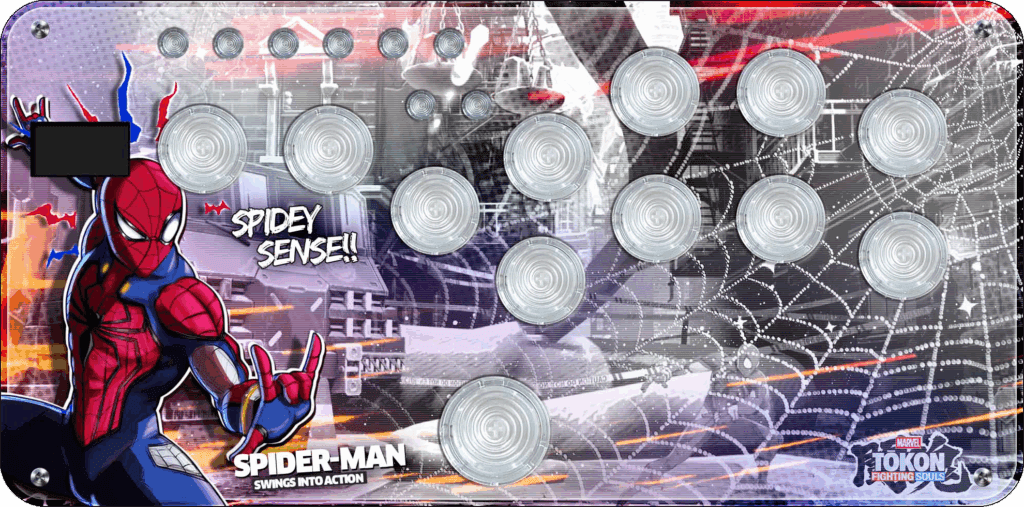
Hey, word on the street is you’d like some custom art! Well, you’re in luck because we at The Arcade Stick have made art for Speedy Labs controllers before and would love to make a new design for the top & bottom of your SplitFox Pro. Feel free to check out the LightFox art below by our artist Carlos Martinez (who is ready to serve you too):
In all honesty, few mini controllers pack as much value into their little frame as the SplitFox Pro, so it should be high on your priority list when shopping for your next daily driver.