

| Price | AliExpress & Amazon |
| Release | Circa August 22, 2025 |
| Compatibility | PS5 / PS4 / PC |
| Dimensions | 14.4″ x 10.2″ x 1.2″ |
| Weight | 3.53 lbs |
| Cable | 3 m |
Introduction
Over the years, we have gotten used to Qanba choosing interesting names for its controllers, and with the Sapphire S1, the case is no different.
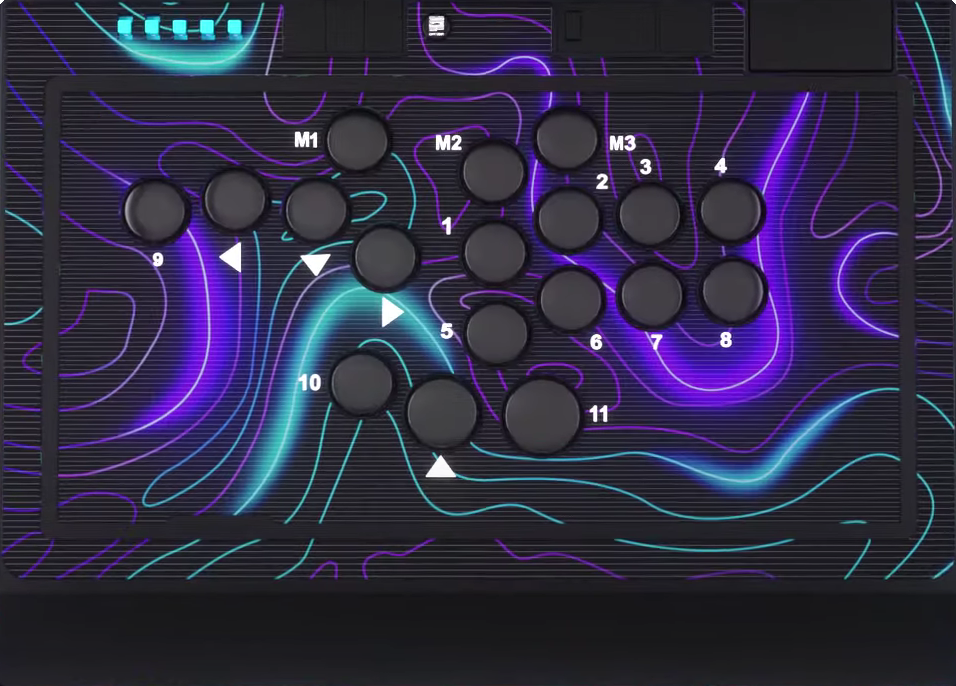
The Sapphire is a leverless controller with a whopping 18 buttons—some of which are different sizes: 32, 30, and 24 mm. Basically, everything is 24 mm, but the jump button is 30 mm, and the button to its right is 32 mm.
The many buttons mean that you can use the Sapphire for modern fighting games. You can also use it as a WASD controller if you prefer that layout, such as if you come from a keyboard background.
The Sapphire is licensed by Sony, meaning it should work on future PlayStation consoles as well—saving you money. This is something we have gotten used to with the bestselling brand, Qanba.
Unboxing
The Sapphire’s box is mainly white—with both Qanba and Sony branding. The front of the box primarily features the beautiful controller’s picture, and the back has some useful information. The box is a bit longer and wider than the controller itself, which makes sense so the controller can fit in there nicely.
In addition to a shoulder strap, your brand new Sapphire should arrive with the following free items stored within it:
- 32 mm keycap cover
- 30 mm keycap cover
- 24 mm keycap covers (3)
- Extra switches (2)
- Keycap/switch remover
- Blue adjuster
The blue adjuster is to adjust the buttons’ travel distance. You can rotate that adjuster on the desired button to choose from a long, medium, or short distance. Without further ado, let’s discuss the Sapphire’s performance!
Performance
With satisfyingly responsive Qanba Gravity buttons, let’s start off by saying that the Sapphire’s leftmost button is for your left pinky. Secondly, there are a couple of disclaimers worth noting here:
- The 24 mm buttons may feel smaller than you prefer.
- The buttons may also feel squishier than you prefer.
That said, the Sapphire’s Cherry MX Speed Silver switches are hot swappable. If you stick to these standard profile switches, you may be glad to know that they are linear, fast, quiet, smooth, and durable.
Another awesome aspect about the Sapphire is that its rubber pad covers the entire bottom. Additionally, the USB-C cable is detachable from its hinged compartment (that has a locking function), making the controller more convenient to travel with as you win tournaments worldwide.
Traveling with the Sapphire is especially convenient if you carry the controller with its shoulder strap. One more thing: you can find a 3.5 mm headset jack in the controller’s back left to stay super focused in-game.
Hardware
Made of hefty plastic, the Sapphire is a slim controller, and it has a detachable memory foam slope where you can rest your wrists to comfortably game for longer hours.
If you remove that foam slope, you can reveal the keycap covers, extra switches, keycap/switch remover, and adjuster mentioned in the Sapphire’s unboxing section above.
From left to right, the six function buttons of the Sapphire are for:
- Glow
- Create
- Mute
- PS
- Settings
- Options
(If the options button gets stuck, you can try lifting up the button a little bit and then setting it right back in.)
In addition to the aforementioned function buttons, what you can find on the Sapphire also includes a screen, touchpad, and the following toggles:
- PS5/PS4/PC
- Lock/unlock
- LED/off
- TP/C
- 1/2/3
You may be wondering what the 1/2/3 toggle is for. It’s to cycle through your saved button mapping configuration files. On the Sapphire’s screen mentioned earlier, you can see your currently selected button mapping configuration.
Appearance
The Sapphire is a thing of beauty. One stylistic choice you can make is either a colorful foam slope or just a black flat panel for your wrists. Otherwise, the Sapphire’s bottom has a lot of screws (specifically 11), but on the bright side, the pad there has an interesting geometric pattern.
Do you remember the Sapphire’s glow function button mention earlier? It’s for controlling the optional light that shines through the buttons and sides, making the controller stand out. In fact, here are the five LED modes:
- Cool blue
- Rainbow glow
- Dynamic blue pulse
- Dynamic rainbow flow
- Custom glow with Qanba linear button press
If you’d like the controller to stand out even more, consider customizing its art—and we at The Arcade Stick can make that process easier for you with our art service. Just take a look at this Sapphire art by our designer, Felipe Fernandez:

(If you have some preexisting Sapphire digital art, we can also print it for you.)
Conclusion
The Sapphire is a bargain because it has a dual layout, lots of buttons, custom art, Sony licensing—plus more!
- 18 Qanba buttons
- Button configurations
- Swappable switches
- Adjustable travel
- Dual layout
- Headset jack
- Optional slope
- Shoulder strap
- Quality plastic
- Slim enclosure
- Full bottom pad
- Unique screen
- Customizable art
- Five LED modes
- Free accessories
- Licensed by Sony
- Squishier buttons
- Most buttons might feel small
- One button may need reinsertion
Rating
⭐⭐⭐⭐⭐