

| Price | FightBoxArcade |
| Discount Code | THEARCADESTICK |
| Release | April 2024 |
| Compatibility | PS5 / XSX / NS2 / PC |
| Dimensions | 13.8″ x 7.9″ x 1.8″ |
| Weight | 3.31 lbs |
| Cable | ~3 m |
Introduction
You may be familiar with the FightBox F series. The K series is different in ways like having Crown buttons. Not just that, some controllers in this series even have a joystick! That said, let’s focus on the K10. It’s got plenty of buttons to aid in your pursuit of championship trophies.
Performance
The K10 uses Crown SDB-203C buttons. These Samducksa buttons are 24 mm—except for the 30 mm jump button. Just like standard leverless controllers, the jump button being bigger than the rest lets you conveniently press it with your thumb’s side.
By the way, there are 15 of those main buttons. This means that the K10 allows you to put your left pinky, right index, and right thumb to good use by pressing three more buttons than leverless controllers usually have.
Moving on, the K10’s switches are the fast yet smooth and quiet Cherry MX Speed Silvers with these awesome stats:
- 45 gf actuation force
- 1.2 mm actuation point
- 50 million press lifespan
Admittedly, the Baolian aux buttons are stiff—though this is a blessing in disguise because there’s a lower chance you’ll press them accidentally while using the K10 at a tournament.
Hardware
In essence, the K10 is a metallic-acrylic controller. The metal feels good, and the top panel is acrylic that’s not malleable. Plus, the weight is decent, and the overall size is good for lap placement.
For desk placement, the K10 has six anti-slip feet. These are more than usual, but you can still move the controller around if you want.
Anyway, those same feet are where you can find the screws you’d need to unscrew with something like a Phillips PH1 screwdriver—if you’d like to crack open the K10.
You can then use a long flathead screwdriver to access the top panel’s plastic nail retainers through the K10’s bottom. After that, remove the two USB screws—a useful implementation that allows you to replace the USB-B port if needed—and voila: you’re done!
While not the thinnest, the K10’s case is fairly thin—yet you’ll notice that the wiring inside is neat, which is impressive. With that being said, it’s important to share the good news that there are different PCB options—ranging from the affordable Pico Plus with limited compatibility to the pricier Brook Gen-5X with insane compatibility.
Here’s a sample lineup of what your K10’s function buttons could serve as:
| Back Left Buttons | Back Right Buttons | Right Side Buttons |
|---|---|---|
| Home | R3 | Start |
| Touchpad | L3 | Select |
Appearance
Did you know that the K10 can come in a white or black case? If we factor in the buttons and everything else too: the combination of white, black, and red works quite nicely as a color scheme.
If you choose the K10’s black edition, the top panel can show fingerprint smudges, but that’s expected from acrylic, and you can always wipe down smudges with a towel like you’re Andie MacDowell.
Now, if you’d like custom art for your K10, our artist Felipe Fernandez can help you with that. The truth of the matter is that he has already created a custom design with a similar template before—and can do the same for you:
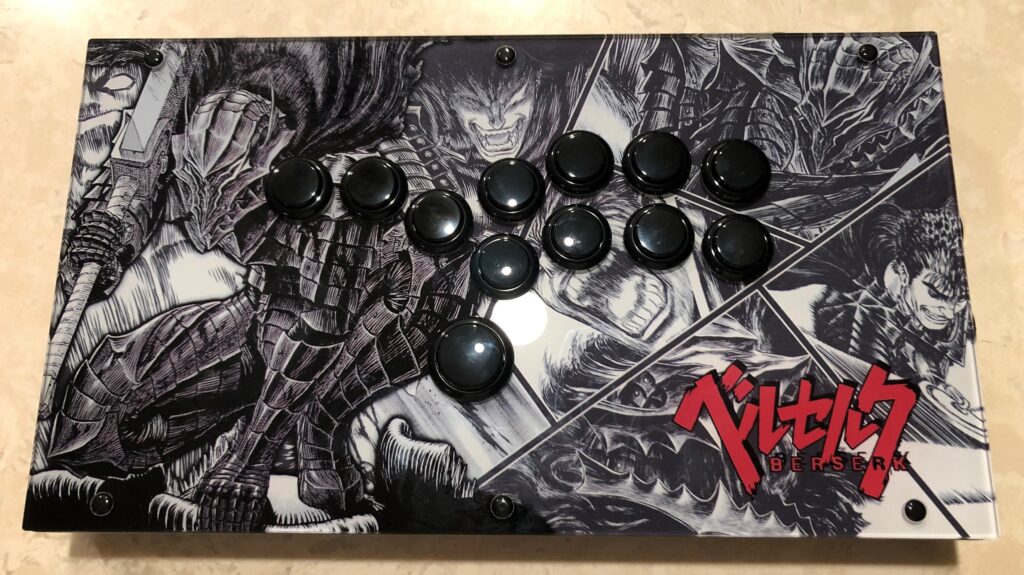
(If you already have some K10 art, we can just print it for you.)
Conclusion
The K10’s unmatched Crown buttons coupled with Cherry MX Speed Silver switches make it a formidable controller in any fighting game tournament!
- Lever or leverless
- White or black
- Crown buttons
- Cherry switches
- Generous sizing
- Moderate weight
- Metal-acrylic mix
- Organized wiring
- Replaceable port
- Customizable art
- Diverse compatibility
- Multiple layout choices
Rating
⭐⭐⭐⭐⭐
Links
- FightBoxArcade (10% code: THEARCADESTICK)
- RetroArcadeCrafts
- AliExpress