| Price | Amazon |
| Release | October 19, 2026 |
| Compatibility | NS2 / PC |
| Dimensions | 13.4″ x 9.4″ x 1.4″ |
| Weight | 2.16 lbs |
| Cable | 3 m |
18 Button Edition
Introduction
Truth be told, the resurgence of Mad Catz from bankruptcy has been a bit rocky. None of its three new controllers became super popular, including the NEKO, but with its sequel, the NEKO KO, things may or may not change for the better. How? Read on to find out!
Unboxing
Here are some interesting freebies you can expect to come with your NEKO KO:
- Mad Catz sticker
- Keycap/switch puller
- Hexagonal screwdriver
- Warranty card
- Manual QR code
- USB-C to A cable
Performance
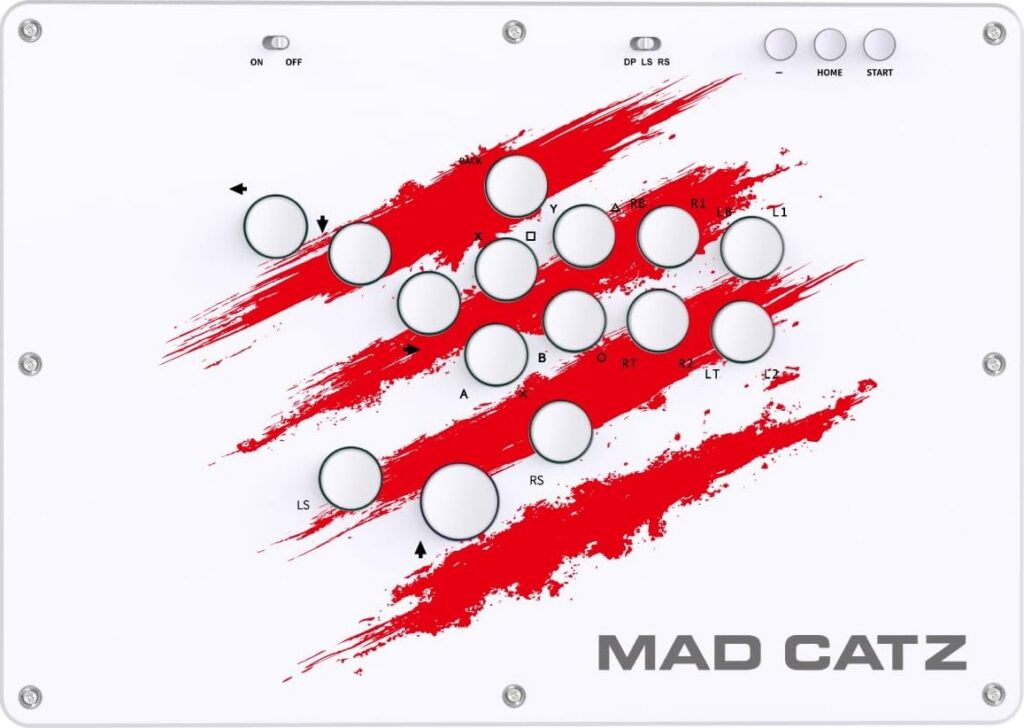
Were you overwhelmed by the original NEKO’s too many buttons? No worries, the NEKO KO has less buttons, but there’s still a good number of buttons: 15 buttons.
If you’re a Street Fighter 6 player, you can use the NEKO KO’s three additional buttons for things like Drive Impact, Drive Rush, and Drive Parry. More precisely, you can press these three additional buttons with these three fingers:
- Left thumb
- Right thumb
- Right index
Other than that, the NEKO’s uniquely slanted directional buttons make a comeback with the NEKO KO. Furthermore, low profile Kailh linear switches are used, and these switches are hot swappable in case you have another preference.
Even the NEKO KO’s keycaps are swappable, and their size is mainly 20 mm, except for the 25 mm jump button. You see, it’s quite standard for leverless controllers to have a bigger jump button than the rest. This allows for easy thumb-side pressing.
On a closing note when it comes to performance, the NEKO KO’s panel is sloped, so if you think such a slope makes your wrists more comfortable during play, then this could be awesome for you.
Hardware
The NEKO KO is big yet slim and light. Now, don’t be concerned that this controller is so light that it’ll slide off your lap… The truth is that the controller has two anti-slip strips at the bottom that should line up with your legs as you play fighting games for hours.
Moreover, the NEKO KO’s extended compatibility list includes:
- Nintendo Switch 2
- Nintendo Switch
- PlayStation 4
- PC
You can connect your NEKO KO by way of USB-C, by the way. Other than this, we did want to let you know what this controller’s toggles and aux buttons do:
| Label | Function |
|---|---|
| On/off | Key lock toggle |
| DP LS RS | Directional input toggle |
| – | Touchpad/capture button |
| Home | Home button |
| Start | Start button |
Appearance
Compared to the black NEKO, the NEKO KO is white, but it shares the iconic red slashes. However, the NEKO KO doesn’t accept paper art like the NEKO does. Instead, you can put vinyl art on the NEKO KO. We at The Arcade Stick can design such art for you through our custom art service.
Otherwise, the NEKO KO’s cable and anti-slip strips are black (if that matters to you). White or even red colors could’ve been more fitting, no?
Conclusion
The NEKO KO is for the fighting gamer who needs 15 buttons to optimize his or her performance in modern fighting games like Street Fighter 6, especially if this same fighting gamer prefers the directional buttons to be a bit slanted—plus a sloped panel.
- 15 swappable keycaps
- Fast Kailh switches
- Anti-slip strips
- Sloped panel
- Big, slim, light
- Interesting freebies
Rating
⭐⭐⭐⭐⭐