
| Price | AliExpress |
| Release | Circa September 2025 |
| Compatibility | NS2 / PC / Android |
| Dimensions | 11.4″ x 5.1″ x 0.5″ |
| Weight | ~1.41 lbs |
Introduction
Will you go tap on the GoTap to react to your opponent’s moves, do some sick combos, and win the match? This is one of the most “special” controllers (as Jose Mourinho would say), and there’s one surprising aspect about this controller that we’ll reveal to you later on in this review. Enjoy!
Unboxing
Your GoTap may come with:
- 10 anti-slip silicone pieces
- 2 mm hex screwdriver
- USB-C to A cable
Your AliExpress listing of choice may offer you a USB-C to C cable instead. Further, you don’t need to install all 10 anti-slip silicone pieces onto your GoTap. You can just keep the rest as backups.
Performance
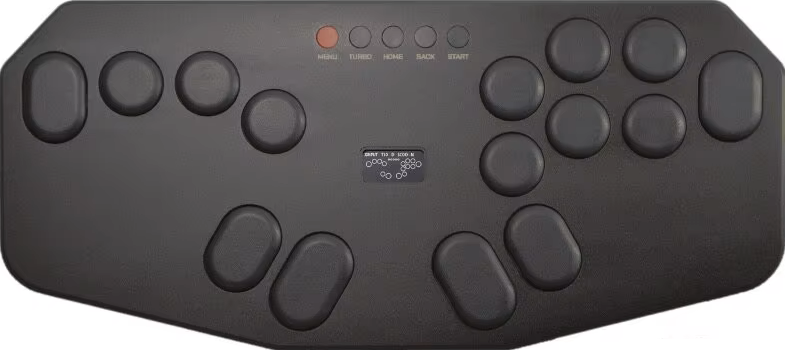
The GoTap has 15 buttons, and these PBT buttons have rounded edges. Six of the buttons are pill-shaped, and the pill-shaped buttons come in at least two sizes. So, which of your fingers will be enjoying these pill-shaped buttons?
- Left pinky
- Left thumb
- Left thumb (again)
- Right thumb
- Right thumb (again)
- Right pinky
At this point, you may have noticed that the GoTap has one pill-shaped button on the very right instead of two round buttons. This may make Drive Impacts easier for you as a Street Fighter 6 player.
Yet, the GoTap can work with any fighting game, really… Not only that, it’s got a split layout, so one thing you can do is have your left hand focus completely on directional inputs, whereas your right hand can focus completely on attack inputs—and all of that happens while both of your hands enjoy plenty of real estate to move around instead of them being in a confined space.
Meanwhile, the GoTap has these five function buttons (which are questionably flush with the top panel):
- Menu
- Turbo
- Home
- Back
- Start
The GoTap’s start button being on the very right makes it convenient to press since it’s close to the attack buttons. The start button is one of those buttons that you frequently need to press to skip cutscenes etc.
Don’t think we forgot to cover the GoTap’s switches, though. These are ultra-low profile Kailh Box Falcon linear switches with a decent response, but if you don’t like the specs below, you can just swap out the switches:
| Spec | Value |
|---|---|
| Actuation force | 42 gf |
| Actuation point | 1.3 mm |
| Total travel | 2.0 mm |
Hardware
With a metal top panel and acrylic bottom panel, the GoTap remains light & portable. There’s also a screen in the middle of the controller, which shows you information like:
- Profile
- Turbo speed
- Input method
- Directional mode
- SOCD mode
- Focus mode
Focus mode is to disable function buttons during a tournament match, but here’s a pet peeve: the GoTap’s pill-shaped buttons don’t seem to be portrayed as pill-shaped buttons on the screen, but you can still tell which buttons are which.
On the bright side, the GoTap utilizes the popular Raspberry Pi Pico MCU, running on the reliable GP2040-CE firmware. The result? You get 1 ms (or less) input delay, which is almost zero delay.
Now, how do you plug in the GoTap? It has these two USB-C ports:
- USB-C port in the back
- USB-C port on the right
Finally, you have a USB-A port on the left where you can insert your own adapter to make the GoTap compatible with additional modern consoles.
Appearance
Aside from its red menu button, the GoTap is mostly black—unless you go for the white GoTap Lite. This is the surprise we’ve been wanting to tell you about!
Indeed, there’s a light version of the GoTap that’s not only lighter but also white, although its shade of white is a bit see-through. This same shade of white can be seen on the standard version’s bottom panel.
Now, how does the GoTap pull off its light version? Put simply, the light version is entirely acrylic instead of part acrylic, part metal. This way, it shaves about half a pound off the standard version, which isn’t much heavier, by the way.
Other than that, one may describe the GoTap’s shape as a modified octagon. It’s got eight sides, but it isn’t a perfectly symmetrical octagon like you see in the UFC, and it’s not obliged to have equal sides anyway. Rather, it looks edgy.
Conclusion
With the GoTap’s 15 buttons—some of which are pill-shaped—you’re spoiled for choice, and you’re bound to see an improvement in your performance once you master this controller’s split layout.
- Kailh Falcon switches
- 15 PBT buttons
- Six pill buttons
- Split layout
- Focus mode
- Turbo mode
- Useful screen
- Unique shape
- Two USB-C ports
- GP2040-CE firmware
- Raspberry Pi Pico MCU
- Expandable compatibility
- Metal top, acrylic bottom
- Anti-slip silicone
- Light version
- Function buttons too flush
Rating
⭐⭐⭐⭐⭐