
| Price | AliExpress |
| Release | Circa April 2026 |
| Compatibility | NS2 / PC / Android |
| Dimensions | 11.8″ x 8.7″ x 0.7″ |
| Weight | 2.33 lbs |
| Cable | 2 m |
Introduction
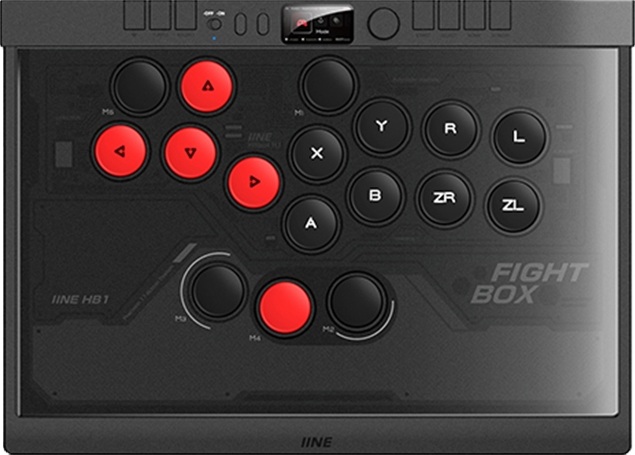
It feels like wireless leverless controllers are becoming the standard. You get to play at a distance from the monitor and avoid plugging in your controller before every game session. The IINE HB1 is also wireless, yet its most unique aspect is its extra left ring-finger button.
Unboxing
Here’s what you can expect in your HB1’s box:
- 17 button covers
- 7 spare buttons
- Button puller
- Braided USB-C cable
- Wireless receiver
Performance
The HB1 has 17 ABS buttons that are 25 mm in size, meaning they’re 1 mm bigger than the standard 24 mm size. If you measure the distance from each button’s center, the gap is 29.8 mm.
The best way to describe the buttons is that they’re flat in the center and rounded on the outside. Since there are 17 buttons, the HB1 has five more buttons than the classic leverless layout that emerged more than a decade ago. So, the question is: which fingers can you use to press the five extra buttons?
- Right index
- Right thumb
- Left thumb
- Left middle finger
- Left ring finger
Yeah, you can actually use your left ring finger to press one of the HB1’s extra buttons, which is super rare. It may become your preference over a left pinky button. On a side note, the left thumb button sits a little bit higher up the panel than the right thumb button.
That said, another rare feat that the HB1 does with its buttons is how there are 17 button covers in case you want to cover buttons you don’t use.
(Similar controllers usually have only a few or several of those button covers, but the HB1 allows you to cover all of its buttons if you want.)
Now, we need to address the HB1’s red switches. These are light Raesha switches with a quieter sound due to their internal silicone mufflers.
Moreover, the HB1’s switches are linear and optical—the latter of which means they operate through light instead of mechanically. This can reduce wear and tear, increasing longevity. In fact, you can expect up to 70 million presses, but if you feel like the switches have too strong of a rebound, you can swap them out.
Let’s end the performance section with a table of what the HB1’s command center does. By command center, we’re referring to the area above the main buttons. We’ll go from left to right, and in addition to describing each input’s function, we’ll also describe whether it’s a button, toggle, dial, and so on:
| Function | Style |
|---|---|
| Wireless | Rectangular button |
| Turbo | Rectangular button |
| Macro | Rectangular button |
| Off/on | Toggle |
| L3 | Pill button |
| R3 | Pill button |
| Settings | Dial |
| Start | Rectangular button |
| Select | Rectangular button |
| Home | Rectangular button |
| Screen | Rectangular button |
Hardware
The slim and light HB1 is about the size of an A4 sheet of paper. It’s got quite the blend of materials as part of its hardware. Let’s list the materials from top to bottom:
- Acrylic
- ABS
- PCB
- Acrylic
- Steel
Truthfully, the HB1’s acrylic top may dig into your palms a bit since it’s slightly raised compared to the rest of the area. Thankfully, there’s a subtle palm slope under there. On another positive note, the steel bottom has four big feet that are square-shaped and made of rubber.
As for the wireless connection, the HB1 runs on a 1,000 mAh battery that can last you six to eight hours before you need to charge the controller again. Flip the controller over to then insert the wireless receiver near the bottom left foot. Here are your connection options:
- 2.4G
- Bluetooth
- Wired
Regarding the USB-C port, you’ll likely have to flip over the HB1 as well to insert the USB-C cable there. This is a recessed USB-C port, and while recession leads to more security, it can also be a hassle whenever you plug & unplug the controller. Not just that, the USB-C cable has to follow an elbow-style tunnel to finally make it to the USB-C port.
On the bright side, did you notice the HB1’s screen? It can show you aspects like:
- Turbo setting
- Macro setting
- SOCD setting
Not only that, you can see which button does what. Say you’re doing Marvel Tokon combo challenges and don’t know which button corresponds to, say, Y or RT. A screen like the HB1’s can solve this mystery.
Appearance
The HB1’s color scheme is predominantly black and red. Namely, its directional buttons are red, whereas its other buttons are black. Other than that, the controller has some geometric art on its acrylic top.
Conclusion
The HB1’s left ring-finger button is super rare, and it’s insane that the controller comes with 17 button covers. Wireless leverless controllers are becoming more common, but they’re still relatively rare too.
- Wired or wireless
- 17 buttons with covers
- Swappable optical switches
- Subtle palm slope
- Steel, acrylic, ABS
- Slim & light
- A4-like size
- Big feet
- Braided cable
- Useful screen
- USB-C port too recessed
- Acrylic top not flush
Rating
⭐⭐⭐⭐⭐