
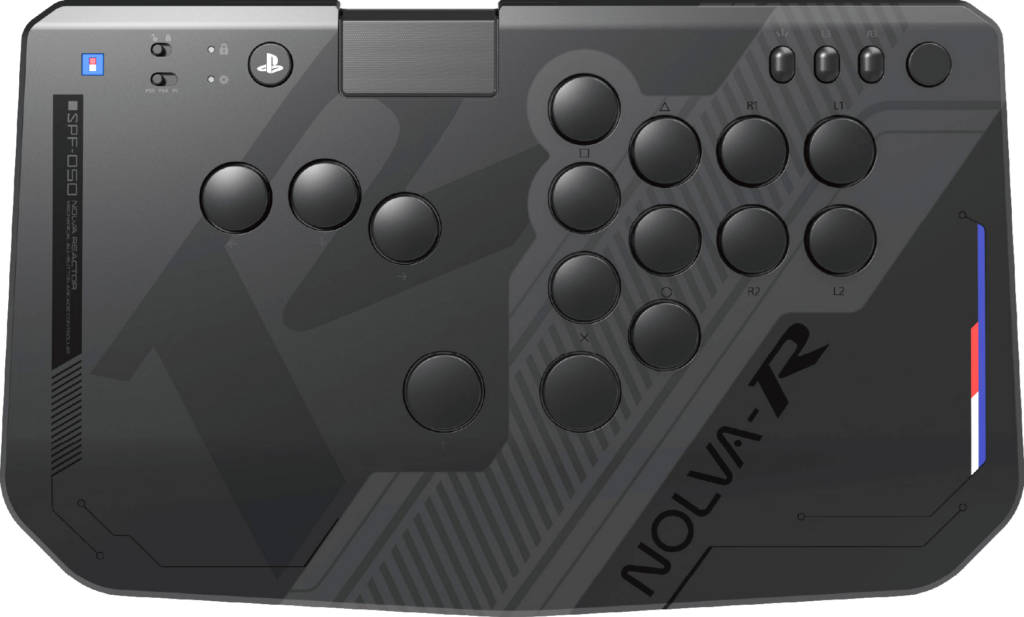
| Price | Amazon |
| Release | June 25, 2026 |
| Compatibility | PS5 / PC |
| Dimensions | 13.8″ x 8.3″ x 1.2″ |
| Weight | 1.59 lbs |
| Cable | 3 m |
Standard Edition
Introduction
React to your opponents’ moves with the Hori NOLVA Reactor! While the standard NOLVA wasn’t exactly flying off shelves when it came out, this newer controller may be more popular.
Hori has been making arcade sticks since the 90’s around the time Street Fighter II came out. Actually, one may argue that its first arcade stick came out in the 80’s.
Thus, read on to find out how Hori was able to condense its decades of knowledge into producing one of the best leverless controllers ever: the NOLVA Reactor.
Unboxing
Your NOLVA Reactor should come with:
- Instruction manual
- Black USB-C to A cable
- Button/switch puller
The NOLVA Reactor’s button/switch puller is quite easy to use. It’s also neat that it works on both buttons and switches. Other than that, let’s delve into the performance details.
Performance
The NOLVA Reactor has 15 silent buttons in a split layout, so it has three more buttons than the classic leverless layout. Specifically, you can press the three extra buttons with your:
- Right index
- Right thumb
- Right thumb (again)
You can remap the NOLVA Reactor’s buttons using a dedicated app, the Hori Control Center. If you find this app to be buggy, it should be easy to fix by Hori down the line. In fact, by the time you read this article, maybe it has been fixed.
On the bright side, the NOLVA Reactor’s buttons have some unique specs:
- 3 mm tall buttons
- 23 mm diameter buttons (mostly)
- 26 mm diameter thumb buttons
By the way, don’t be mistaken that the NOLVA Reactor’s buttons are just like the standard NOLVA’s buttons just because these controllers share a similar name…
You see, the NOLVA Reactor’s buttons feel much sharper overall than the standard NOLVA’s buttons. Testing this controller in Street Fighter 6 went well, but of course, you can use it with other fighting games too.
The NOLVA Reactor’s silent buttons are great for not giving away your inputs to your opponent sitting next to you at a tournament. The silent buttons are also good if you live with roommates and like to burn the midnight oil.
The silent buttons are so quiet that they almost sound like you’re tapping on the NOLVA Reactor’s panel rather than actual buttons! It seems that these buttons’ silence is partially due to a rubber component they have.
Next up, check out what the NOLVA Reactor’s function buttons are:
- Hori
- PS
- Touchpad
- Create
- L3
- R3
- Option
The Hori button is for button assignment, whereas the NOLVA Reactor’s touchpad pretty much works like a DualSense touchpad. Just note that this touchpad can’t be used on the PC.
If you’re using the NOLVA Reactor at a tournament—which you’ll hopefully win—you can disable the PS, create, and option buttons through a toggle. On PC, these would be equivalent to the start and guide buttons.
Let’s end this section with the NOLVA Reactor’s hot swappable switch specs—which you can see in the table below—but in layman’s terms: the stroke provides a short travel distance, the actuation point results in a shallow press, and the actuation force leads to effortless pressing (or less fatigue). That being the case, we now present to you the table:
| Spec | Value |
|---|---|
| Stroke | 2.0 mm |
| Actuation point | 1.0 mm |
| Actuation force | 40 ± 10 gf |
Hardware
With an approximately A4 size, the NOLVA Reactor is a slim, wide, and light controller with:
- Subtle palm slope on top
- Two non-slip rubber mats
The NOLVA Reactor’s non-slip rubber mats cover almost two thirds of the bottom. They’re placed in a way where they won’t line up with your legs, which is a questionable decision by Hori—unless there’s a mysteriously genius reason.
Yet, a cool hardware element is the cable lock that prevents the USB-C cable from disconnecting. Essentially, there’s a toggle you can flick to reveal the NOLVA Reactor’s USB-C port.
Then, you can insert the USB-C cable in there. Finally, lock the USB-C port back up, and enjoy hours of play with your NOLVA Reactor without worrying about the USB-C cable disconnecting.
By the way, the NOLVA Reactor is officially licensed by Sony, and it’s compatible with the PlayStation 5, PlayStation 4, and PC. For these, there’s a toggle with these labels:
- PS5
- PS4
- PC
Appearance
It seems like the NOLVA Reactor’s shape was inspired by Hori’s own bestselling Real Arcade Pro 1/2/3 arcade sticks from back in ancient times, but now, the controller looks more cutting edge.
The NOLVA-R branding looks slick. You can even see the controller’s SKU, which is SPF-050 (not to be confused with sunscreen). It’s also nice to see some red, white, and blue accents on the NOLVA Reactor—repping Hori’s iconic colors.
Having said that, the NOLVA Reactor’s panel is prone to smudging, so if your hands often get moist on a controller, be sure to have something like a microfiber cloth handy to wipe down the controller, preferably after every session.
Conclusion
If you’re a fan of having 15 silent buttons in a split layout, then the NOLVA Reactor is probably worth a buy for you.
- 15 silent buttons
- Swappable switches
- Split layout
- Slim, wide, light
- Subtle palm slope
- Cable lock function
- Tournament lock function
- Button remapping application
- Officially licensed by Sony
- Prone to smudging
- Bottom mat alignment
Rating
⭐⭐⭐⭐⭐