
| Price | AliExpress |
| Release | August 2026 |
| Compatibility | NS2 / PC / Android |
| Dimensions | 16.7″ x 9.3″ x 1.4″ |
| Weight | 5.07 to 5.29 lbs |
| Cable | 2 m |
Introduction
You may know about the HauteBox Zero, but do you know about the HauteBox One? It’s Haute42’s wireless modular controller by its subsidiary, RetroPlus. You can play with this controller with or without a joystick.
Unboxing
Congratulations, your HauteBox One has now arrived. In its box, which has protective foam, you should find:
- Couple of spare keyswitches
- Switch puller
- Screwdriver
- USB-C cable
- Manual
- Opening pick
(You can consider the HauteBox One’s opening pick to be a keycap remover. As for the manual, it’s conveniently multilingual. Polyglots rejoice!)
Performance
Starting off, the HauteBox One can be used with a joystick module, which seems to use a Kailh Hide Mountain switch and can be used with a square or octagonal gate.
While most “bad” ball-top joysticks may often be taller than a Sanwa joystick, the HauteBox One’s joystick actually feels shorter than a Sanwa joystick, and that’s not necessarily bad. It could be a personal preference kind of thing.
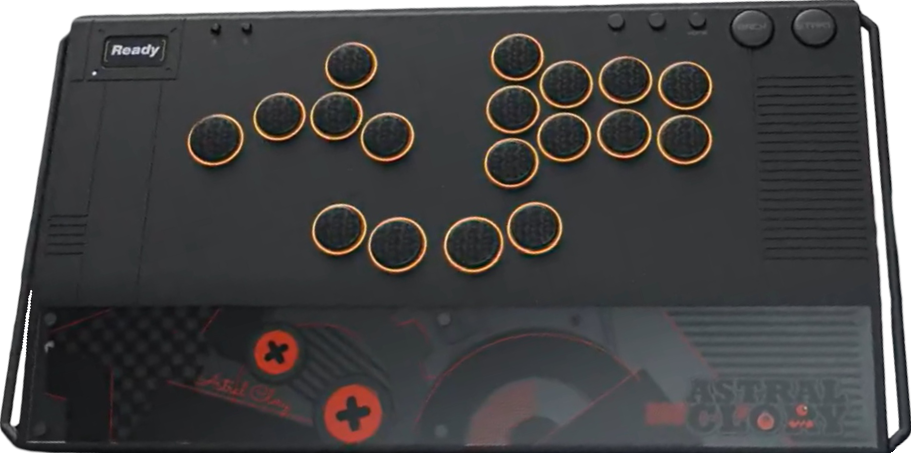
If you want, you can swap out the HauteBox One’s joystick module for a rotatable WASD module. You can rotate this WASD module to find the angle most comfortable for you, and you also have access to a leverless layout this way. Namely, it’s a split layout, so both of your hands can enjoy breathing room.
Basically, the HauteBox One would have 18 buttons that way. Beyond the core buttons, these fingers of yours would have their own dedicated buttons:
- Left pinky
- Left middle finger
- Left thumb
- Right thumb
- Right thumb (again)
- Right index finger
The two centermost thumb buttons are bigger than the rest of the buttons for easier thumb-side pressing. Not only that, the HauteBox One has five function buttons labeled:
- T
- –
- Home
- Back
- Start
(It’s appreciated how the HauteBox One’s back and start buttons are big, especially because the start button is useful to do things like skip post-match cutscenes.)
In general, the HauteBox One’s buttons are made quieter with the multilayered padding that’s built into it. Another piece of padding that this controller has is a big silicone pad at the bottom so it doesn’t slide around while you battle your foes.
In addition, the HauteBox One’s two toggles are a light lock and tournament lock—the latter of which disables function buttons during tournament play.
That said, the HauteBox One’s buttons use black Kailh Moon Rock switches with these intriguing characteristics:
| Characteristic | Description |
|---|---|
| Construction | POM |
| Actuation | Light |
| Pre-travel | 0.8 ± 0.30 mm |
| Full travel | 1.8 ± 0.25 mm |
| Operating force | 30 ± 10 gf |
| Return force | 15 gf min |
Hardware
Made of aluminum alloy, the HauteBox One is a heavy, wide, and spacious controller with a wrist slope. Furthermore, there are left and right handles. These handles aren’t briefcase-big, but they should still allow you to do things like:
- Attach a strap, keychain, lanyard, or charm.
- Shift the controller around your desk or lap.
With the HauteBox One, a useful screen also makes a comeback. By default, the screen shows the last button you pressed in a big font and your recent button press history under it. Moreover, you see details like:
- Input mode
- Turbo mode
- SOCD mode
- Profile number
Now, if you need to make your HauteBox One compatible with additional modern consoles, you can use your own dongle to do so. Other than that, are you excited about the wireless connectivity?
That’s correct: you can connect the HauteBox One wirelessly, avoid trip hazards, and play at a decent distance from the monitor.
To do that, you can use the 2.4G wireless receiver, which can last you up to 50 hours of play per charge. For your knowledge, the HauteBox One’s battery is 3,000 mAh composite lithium.
If you’d rather use your HauteBox One wired: no problem, and you can also make use of the USB-C port’s safety locking mechanism. Even this USB-C port can be considered modular.
Appearance
Like RetroPlus, TBGamer is also an Haute42 subsidiary, and in classic TBGamer fashion: the HauteBox One can have button labels that range from text to icons/art.
When it comes to the LEDs, they light up the buttons’ edges in an elegant way, and you have more than one option for how these LEDs light up. You can also upload a custom image to your HauteBox One’s screen.
As a whole, the HauteBox One is available in dark and light editions:
- Sparkle black
- Space gray
To end with an interesting fact: the HauteBox One’s wrist slope can have a different look from the top panel.
Conclusion
The HauteBox One uniquely combines modularity, wireless connectivity, and a split layout into a spacious controller.
- Up to 18 quiet buttons
- Button LEDs/labels/art
- Great Kailh switches
- Spacious split layout
- Rotatable WASD module
- Joystick module
- Square or octo gate
- Wired or wireless
- Dark or light edition
- Big silicone pad
- Neat handles
- Useful screen
- Tournament lock
- USB-C port lock
- Expandable compatibility
- Heavy & wide aluminum alloy
- Shorter joystick not for everyone
Rating
⭐⭐⭐⭐⭐