
| Price | FightBoxArcade |
| Discount Code | THEARCADESTICK |
| Release | Circa October 2024 |
| Compatibility | PS5 / XSX / NS2 / PC |
| Dimensions | 13.8″ x 7.9″ x 1.8″ |
| Weight | 3.31 lbs |
| Cable | ~3 m |
Introduction
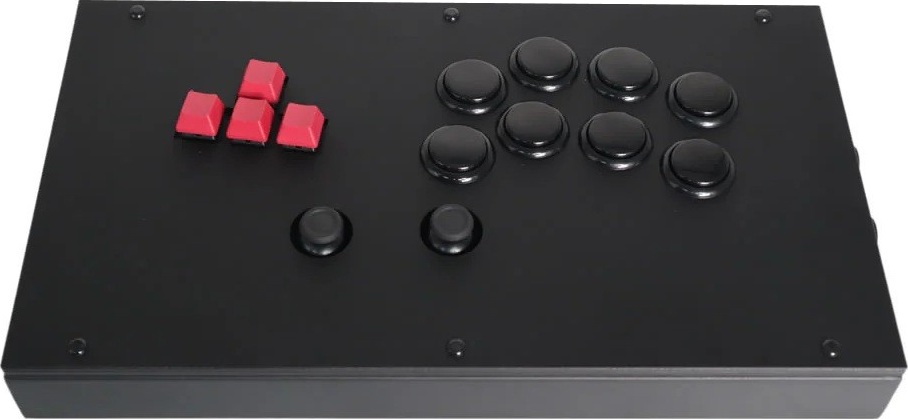
It’s insane how versatile the FightBox F6-Analog-Stick is! This entry in FightBoxArcade’s bestselling F series is like a three-in-one package due to its:
- Analog sticks
- Arcade buttons
- Slanted keys
Therefore, you can use the F6-Analog-Stick to play from adventure games to fighting games. In the wise words of Lil Wayne, “The sky is the limit.”
Unboxing
Find the detachable USB-B cable (usually black) in FightBoxArcade’s blue and orange box. Plug in your brand new FightBox F6-Analog-Stick, and enjoy the ride!
Performance
Essentially, the F6-Analog-Stick has four keys that are slanted for your comfort, eight arcade buttons in the convenient Noir layout, and two analog sticks nearby to be used by your thumbs.
That means you can use the F6-Analog-Stick to move around in adventure games with the analog sticks, for example, or you can even ignore the analog sticks for some games, such as fighting games.
In fact, you can take out the analog stick caps with just your fingers whenever you’re playing a fighting game with the F6-Analog-Stick. If needed, you can swap the analog stick caps with other caps, such as to change their colors. If you’re bold enough though, you can try to play fighting games with the left analog stick plus the arcade buttons!
As for the types of the F6-Analog-Stick’s parts:
- ALPS analog sticks
- Baolian aux buttons
- Sanwa OBSF-30 main buttons
- Cherry MX Speed Silver switches
So, here’s the lowdown: the F6-Analog-Stick’s hot swappable Cherry MX switches are fast, the Sanwa buttons have a light press, the stiff Baolian buttons are hard to accidentally press, and the ALPS analog sticks are near perfect.
You do have to note, however, that you’ll likely use your thumbs’ sides—not their bottoms—to operate the analog sticks. That’s because a controller like the F6-Analog-Stick will have you rest your hands differently from if it were, say, a DualSense controller.
You also have to keep in mind the difference in sensitivity of the F6-Analog-Stick’s keys and arcade buttons. You see, Cherry MX Speed Silver switches are quiet and with a short actuation point. Although the Sanwa OBSF-30 buttons have a pronounced sound, they’re also featherweight in their presses—yet they still trigger differently from the switches.
Thus, you have to adjust to how your left fingers are going to press with a different force from your right fingers. Such is usually the case with controllers that have keys and arcade buttons anyway, so the F6-Analog-Stick isn’t to blame.
Hardware
The F6-Analog-Stick is a hefty metallic controller with an acrylic top, and the controller’s width makes it viable to place on your lap. Moreover, there should be six non-slip feet at the bottom for stability on a desk. Now, if you unscrew the controller and go inside it, you’ll likely be pleased by the color-coded wiring.
Speaking of connectivity, go for the F6-Gen-5X edition of the F6-Analog-Stick if you need crazy compatibility. Alternatively, you can go for the F6-Gen-5 edition, which has less compatibility—yet still has a lot of compatibility. It all depends on your needs and purchasing power.
In any case, both of the F6-Analog-Stick’s editions run on a low latency PCB by the popular brand, Brook. Whichever PCB you end up choosing, epic gamer, the aux button roster should be as follows:
| Back Left Buttons | Back Right Buttons | Right Side Buttons |
|---|---|---|
| Touchpad | R3 | Options |
| Share | L3 | PS |
Appearance
The F6-Analog-Stick has a simple design. Pretty much most of the parts are black—except for the red keys. Having established that, you can have custom art printed directly on the controller or simply slide it under a clear panel.
For F6-Analog-Stick custom art, you can hire our custom art team here at The Arcade Stick. When you have the time, please take a look at this custom art by our designer Felipe Fernandez for the FightBox F series:
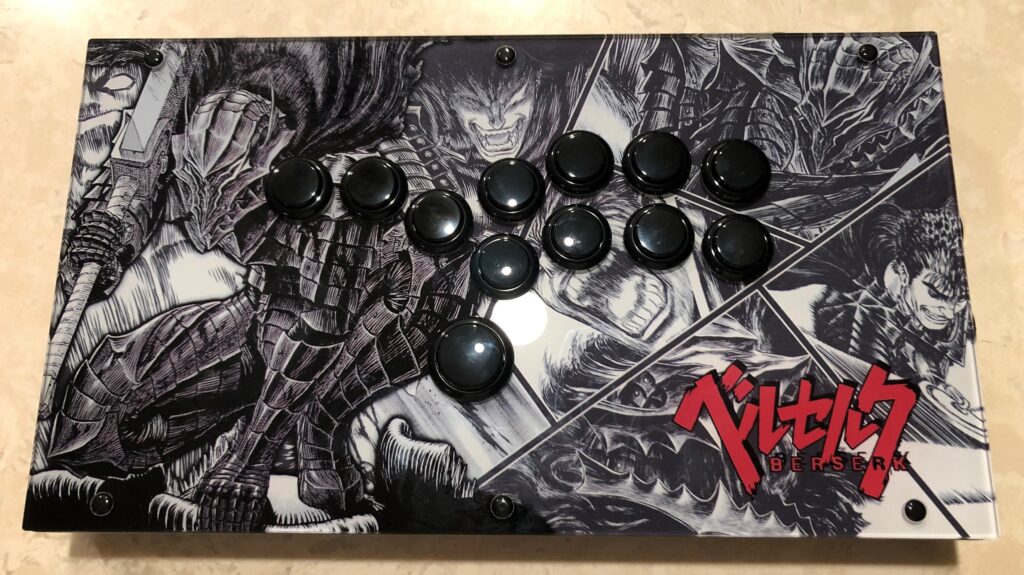
(Got some F6-Analog-Stick digital art already? Have no fear: we can just print it for you!)
Conclusion
The F6-Analog-Stick is a three-in-one deal that gives you the benefits of analog sticks, arcade buttons, and slanted keys.
- ALPS analog sticks
- Sanwa main buttons
- Cherry MX switches
- Hot swap sockets
- Noir layout
- Non-slip feet
- Metal plus acrylic
- Customizable art
- Wide compatibility
- Baolian aux buttons
Rating
⭐⭐⭐⭐⭐
Links
- FightBoxArcade (10% code: THEARCADESTICK)
- RetroArcadeCrafts
- Etsy