

| Price | FightBoxArcade |
| Discount Code | THEARCADESTICK |
| Release | Circa September 2025 |
| Compatibility | PS5 / XSX / NS2 / PC |
| Dimensions | 11.8″ x 7.9″ x 0.7″ |
| Weight | 2.65 lbs |
| Cable | ~3 m |
Introduction
The FightBox B series is one of FightBoxArcade’s series that have a lot of different layouts you can choose from. To save you time, we’ll discuss the B-Pro because it has 17 buttons—a sufficient number of buttons to win you tournaments!
Performance
First things first, the B-Pro’s 24 mm buttons use the smooth and quiet Cherry MX Speed Silver switches, which you can hot swap with other switches if you like.
The B-Pro’s buttons themselves feel and sound good—despite being a bit wobbly—but they are reminiscent of using a keyboard, which you probably expected anyway.
That said, the B-Pro’s buttons are flat and sit taller than usual, though you should get used to them quickly—as well as get used to them all being the same size. During an input check, by the way, there was no noticeable lag.
With that, you may be curious about why the B-Pro has 17 buttons. Essentially, one button gives you access to an optional WASD layout, and the four other extra buttons you should be able to map to whatever helps you play your favorite game better. Here are the fingers you can use to press the five extra buttons:
- Left middle finger
- Left pinky
- Left thumb
- Right thumb
- Right index finger
Admittedly, the B-Pro’s lower edge may irritate your palms, and the controller may slide around, but fortunately, the sliding can be mitigated by installing an anti-slip pad.
Other than that, the B-Pro’s weight is good. It’s light—but not so light that you forget it’s on your lap. More than that, it’s got a good size for lap placement.
Hardware
Put simply, the B-Pro is a slim controller made of acrylic. There’s not much flex to it if you press on it. Not only that, the buttons can be removed and reinstalled with just your fingers—yet they shouldn’t randomly pop off during play.
As for the B-Pro’s function buttons and what they could do:
- Home
- Start
- Select
- Touchpad
- R3
- L3
- Turbo
Otherwise, we did want to let you know that the detachable cable is USB-B to A. You see, the B-Pro can achieve its compatibility through one of the following board options with different console support levels:
| PCB | Description | Price |
|---|---|---|
| Pico Plus | Limited support | $ |
| Brook Gen-5 | More support | $$ |
| Brook Gen-5X | Max support | $$$ |
Appearance
The B-Pro has a smooth, minimalistic look to it. Part of its elegant look comes from the fact that its buttons are unlabeled, but that comes at the cost of not knowing which button does what without referring to documentation.
But speaking of the B-Pro’s buttons, they can come in these colors:
- Black
- White
- Red
Even the case can be black or white. Having said that, the B-Pro’s acrylic can accumulate smudges, which can be more or less noticeable depending on the color you choose. Just wipe them down often.
Now, if you’d like custom art for your B-Pro, our artist Carlos Martinez made art for the B series before and can do the same for you:
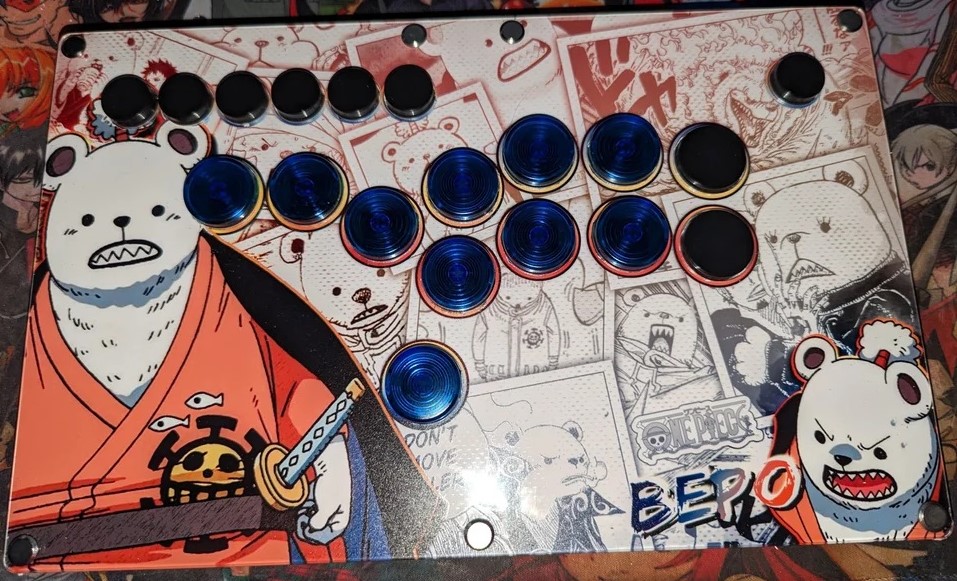
(Hey, do you have some digital art for your B-Pro already—and just need it printed? No biggie, we can print it for ya!)
Conclusion
With the FightBox B series and its many layouts, you are spoiled for choice, but do consider the B-Pro for its 17 buttons that may rank you up online faster.
Plus, the B-Pro’s slim size & multiplatform compatibility mean that you can slide it into your backpack and attend a tournament without worrying about which console is used there, right?
- 17 quickly swappable buttons
- Fast Cherry MX switches
- Outrageous layouts
- Decent weight
- Comfy size
- Quite slim
- Not malleable
- Compatibility choices
- Customizable artwork
- Case and button colors
- Slightly wobbly buttons
- Lower palm rest
- Might slide
- No labels
Rating
⭐⭐⭐⭐⭐
Links
- FightBoxArcade (10% code: THEARCADESTICK)
- FightBoxArcade (Japan)
- RetroArcadeCrafts
- Amazon
- Etsy