
| Price | Alpenmeister |
| Release | August 1, 2026 |
| Compatibility | NS2 / PC / Android |
| Dimensions | 9.1″ x 3.8″ x 1.2″ |
| Weight | 2.65 lbs |
| Cable | 2 m |
DIY Kit
Introduction
After blessing the world with multiple innovative controllers, Bert from Alpenmeister was like, “You know what? I’ma combine everything I learned into one flagship controller: the Alpenmeister TE!”
Then again, you can grab a DIY kit instead if you’d like to build the Alpenmeister TE from scratch in DIY fashion. Whether you grab the DIY kit or preassembled edition, we’d love for you to continue reading to find out more about this interesting controller.
For now, we’ll tell you that the TE in Alpenmeister TE stands for Tournament Edition. Speaking of which, Bert from Alpenmeister has actually reached master rank on Street Fighter 6 online, so he knows what he’s doing. In fact, this Bavarian gentleman makes controllers that he’d like to use himself. You can consider him a modern day Edison.
Unboxing
Your Alpenmeister TE comes with two rare offerings:
- Shoulder strap
- XLR Mini cable
So, you can walk into a tournament in style by carrying your Alpenmeister TE using its black shoulder strap. You can then plug the controller into a console, computer, and so on through an XLR Mini to USB-A cable that’s also black. This detachable cable goes into a port in the controller’s back left.
Performance
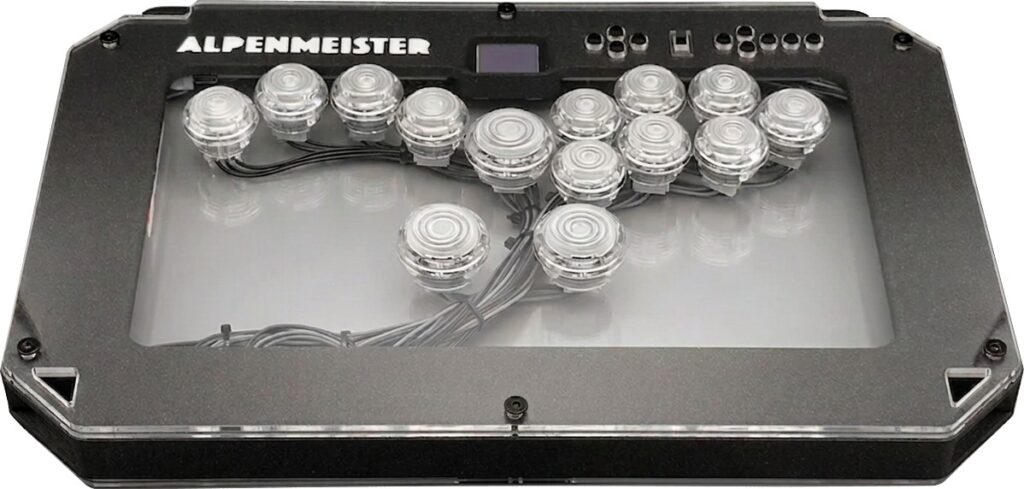
The Alpenmeister TE has 14 buttons in a split layout with Gateron Magnetic Moonlight HE (Hall effect) switches. Let’s dissect this roster step by step, starting with the buttons.
First off, the Alpenmeister TE’s buttons are mostly 24 mm, including the left and right pinky buttons. Then, the center button and two thumb buttons are 30 mm. This latter size makes buttons easier to press with your thumbs’ sides.
Moving on, the Hall effect means that you can adjust the Alpenmeister TE’s button sensitivity from featherweight to a full press. This is where the Gateron switches come in. These linear and pre-lubed switches boast:
- 35 ± 6 gf initial force
- 3.5 ± 0.2 mm total travel
- 100+ million cycle lifespan
(By the time you read this article, the Alpenmeister TE’s rapid-fire feature should have hopefully been released via an online update.)
Meanwhile, the Alpenmeister TE’s aux buttons are for:
- Start
- L3
- R3
- Select
- Home
- Touchpad
At a tournament, you can disable the Alpenmeister TE’s aux button panel by way of its mechanical lockout toggle. Otherwise, this panel also includes D-pad buttons that you can use to navigate menus more easily.
Such D-pad buttons are pretty much unheard of in the fightstick industry—and much appreciated. It would’ve been nice for all the Alpenmeister TE’s small aux buttons to be bigger, however…
Hardware
The Alpenmeister TE is where a PLA case meets an acrylic top. This controller is sized appropriately to place on your lap as you play at a tournament (or at home, of course).
Hidden in the Alpenmeister TE is an extension port where you can insert your own USB-A dongle to make the controller compatible with more consoles. At the time of this writing, the controller should be compatible by default with:
- Nintendo Switch 2
- Nintendo Switch
- PlayStation 3
- PC
- Mac
- Linux
- Android
- Raspberry Pi
At this point, you may have guessed that the Alpenmeister TE runs on the open source GP2040-CE firmware with SOCD cleaning modes, low latency, and the whole nine.
Another giveaway that the Alpenmeister TE runs on that popular firmware is its OLED screen, which is angled for easier viewing. This screen can show:
- Input mode
- Directional mode
- SOCD cleaning mode
- Live animation of button presses
A couple more things we’d like to tell you about are the hooks around which you can wrap the XLR Mini cable—relieving you of having to unplug your Alpenmeister TE in between gaming sessions—and there are also connector terminals for standard arcade buttons. Other than that, the default buttons are actually injection-molded.
Appearance
The Alpenmeister TE’s shape can be described as rectangular with slanted corners. Its spiral buttons are semi-clear, and you can bring them to life with RGB LEDs. Even the Alpenmeister logo and the case itself can light up.
You can embellish your Alpenmeister TE further with custom art on its top and bottom panels. For this, you may be interested in hiring us at The Arcade Stick as we have an art service that’s been running for years. If not, having no art still lets you see the controller’s neat wiring through the clear acrylic.
Conclusion
What other leverless controller do you know that has a D-pad near its aux buttons? It’s also not too common to find controllers like the Alpenmeister TE that have a shoulder strap. Finally, the adjustable button sensitivity lets you optimize your fighting game experience—and hopefully secure more wins.
- Designed by an SF6 master
- 14 Hall effect buttons
- DIY or preassembled
- D-pad included
- Split layout
- Optional art
- Shoulder strap
- Extension port
- GP2040-CE firmware
- OLED angled screen
- LED buttons, logo, and case
- Small aux buttons