
| Price | Akko |
| Discount Code | thearcadestick |
| Release | May 25, 2026 |
| Compatibility | PC / Android |
| Dimensions | 12.0″ x 8.9″ x 1.1″ |
| Weight | ~1.92 lbs |
| Cable | 1.5 m |
Introduction
As a fighting gamer, you may have come across Akko due to its popular switches. More recently, you may have stopped by its booth at Evo Japan—where it showed off its debut leverless controller: the Funbox.
Unboxing
The Funbox comes in a stylishly purple and white box. Pop the box open, and remove the black foam cover that reveals the box items in cinematic fashion.
That said, Funbox’s primary box item is its USB-C cable with a useful Velcro tie. Other than that, you can also order the controller bundled with a Brook Wingman FGC2 adapter to make it compatible with more consoles.
Performance
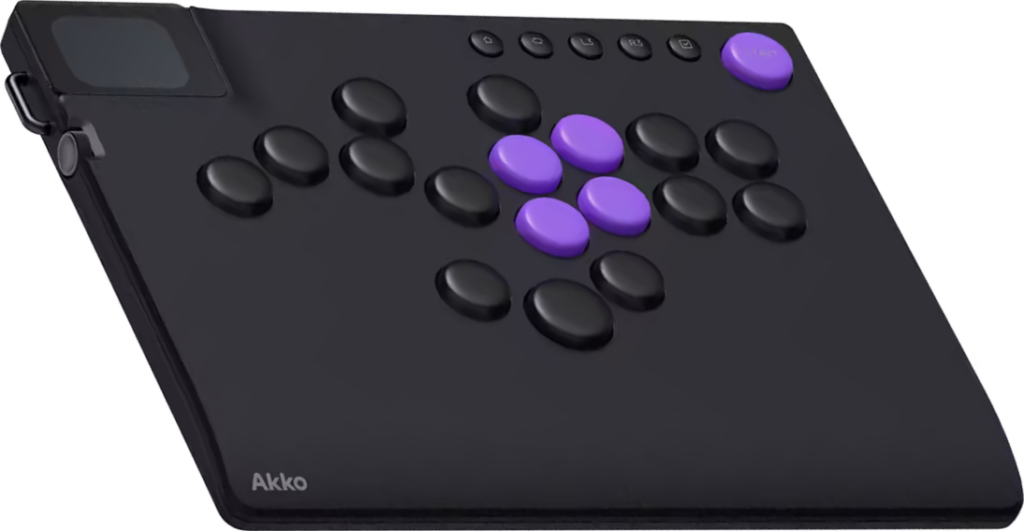
With 17 main buttons, Akko managed to put buttons on the Funbox in all the recently popular locations on leverless controllers. Generally speaking, you can press the five extra buttons with your:
- Right index finger
- Right thumb
- Left thumb
- Left pinky
- Left middle finger
You can use that left middle-finger button specifically to unlock a WASD layout on your Funbox. This is especially useful if you come from a keyboard background.
Meanwhile, you may ask yourself: why is the Funbox’s bottom jump button bigger than the rest? This way, you can press it more easily with your thumb’s side.
Just note that the Funbox’s buttons are essentially higher profile keycaps, which may make you feel like you aren’t getting the most instantaneous responses from your inputs. It depends on your preference.
About the Funbox’s function buttons, enabling the tournament lock disables:
- Home
- Turbo
- Select
- Start
The Funbox’s big start button is much appreciated because you can easily press it to skip cutscenes in between matches, well, depending on the fighting game. Even the other function buttons like L3 and R3 are relatively big.
At its core, the Funbox is compatible with low profile Kailh Hall effect switches and Kailh 3-pin mechanical switches. That being said, the switches that come by default are the low profile Kailh Star Magnetic Mini switches. Made of POM, PC, and nylon, these Hall effect switches boast the following properties:
- 30 ± 10 gf actuation force
- 2.8 ± 0.25 mm total travel
- 100+ million keystrokes
- Contactless design
- Zero wear
You can consider Kailh Star Magnetic Mini switches to be around 75% lighter than, say, Kailh Choc Red or Cherry MX Red switches. Otherwise, the Funbox allows you to adjust the switches’ total travel between 0.1 and 2.8 mm. Here’s a little bit more about the 0.005 mm rapid trigger on PC:
- 8,000 Hz polling
- 50 KHz scan rate
Now, because the Funbox’s switches are hot swappable (without needing tools), you can enjoy rare Kailh switches like Drift, Winter, Summer, and Cloud. Here’s a brief guide to quickly understand what these switches are all about:
| Switch | Style |
|---|---|
| Kailh Drift | Tactile |
| Kailh Winter | Tactile |
| Kailh Summer | Clicky |
| Kailh Cloud | Linear |
Hardware
The light and fairly slim Funbox has a palm slope. Its size also makes it good to place on your lap. Moreover, the anti-slip pad covers most of the bottom, which is always appreciated. It’s probably this same anti-slip pad that gives the controller a fresh new car smell, which is pleasant but will probably go away after a while.
Moving on, the Funbox has an aluminum dial for quick access to settings and mode switching. Near this aluminum dial is an accessory loop to which you can attach whatever you want.
Impressively, the Funbox’s 2″ LCD screen is full color. This LCD screen can be found in the top panel’s upper left corner, and its interface looks different than your typical GP2040-CE screen.
You may even perceive the Funbox’s LCD screen to look better than the GP2040-CE screen. There’s even a kawaii anime lady that often pops up on the LCD screen. Having said that, the LCD screen can show:
- Custom image
- Onboard memory
- Button presses
- Mode switching
- SOCD cleaning
- Neutral
- Up priority
- First input
- Last input
Compatibility-wise, connecting to PC is straightforward. Just insert the included USB-C cable into the Funbox’s center back USB-C port, which is in a bit of a deep tunnel for safety purposes. Admittedly, this tunnel can also make it hard to insert the USB-C cable.
Not only that, there’s an optional rubbery component you can insert to really keep your Funbox’s USB-C cable in place. This rubbery component can feel a bit tough to insert and take out, but as with most such things: the tougher the rubbery component is to take out, the less likely your USB-C cable will unplug accidentally.
For the Nintendo Switch 2, you might be able to connect the Funbox via docking or direct to console—the latter of which you would probably need your own OTG adapter for.
But what about Xbox and PlayStation 4 connectivity? You would need to hook up Xbox and PS4 controllers to the Funbox. As for the PS5, you can use something like the Brook Wingman FGC2 adapter.
By the way, you have access to the following settings through the Funbox’s web driver:
- LCD screen startup animations
- Rapid trigger settings
- Button mapping
Appearance
It’s interesting how the Funbox contrasts its mainly black color with five purple buttons, which you should be able to swap out for black buttons if you really want. In any case, the black USB-C cable pairs nicely with the controller.
Other than those, the Funbox’s EDM (electrical discharge machining) surface finish makes it fingerprint-resistant and anti-glare. This isn’t just marketing copy; the controller has been tested and is quite good at maintaining its glittery shine without major smudges. Lastly, the white Akko logo is tucked neatly into the top panel’s bottom left corner.
Conclusion
At this point, you may be overwhelmed with the Funbox’s endless features. At the end of the day, it’s assuring that this controller was developed by a reputable manufacturer in the keyboard space, Akko.
With the rare Kailh Hall effect switches, you can adjust the Funbox’s feel to make gameplay as smooth as possible for you. This is boosted by the fact that there are 17 buttons in all the right places. Combine all of the above, and this controller can increase your chances of winning tournaments.
- 17-button dual layout
- Bigger function buttons
- Adjustable Kailh switches
- Turbo functionality
- Tournament lock
- Settings dial
- Web driver
- Accessory loop
- Velcro cable
- Anti-slip pad
- Palm slope
- Spacious & light
- Full color screen
- Fingerprint-resistant surface
- Higher profile keycaps
- Finicky cable lock
- Fairly slim
- Accessory-dependent compatibility
- Shorter cable
Rating
⭐⭐⭐⭐⭐