
| Price | AliExpress |
| Release | Circa July 2026 |
| Compatibility | NS2 / PC / Android |
| Dimensions | ~11.7″ x ~8.3″ x ~0.6″ |
| Weight | ~2.93 lbs |
Introduction
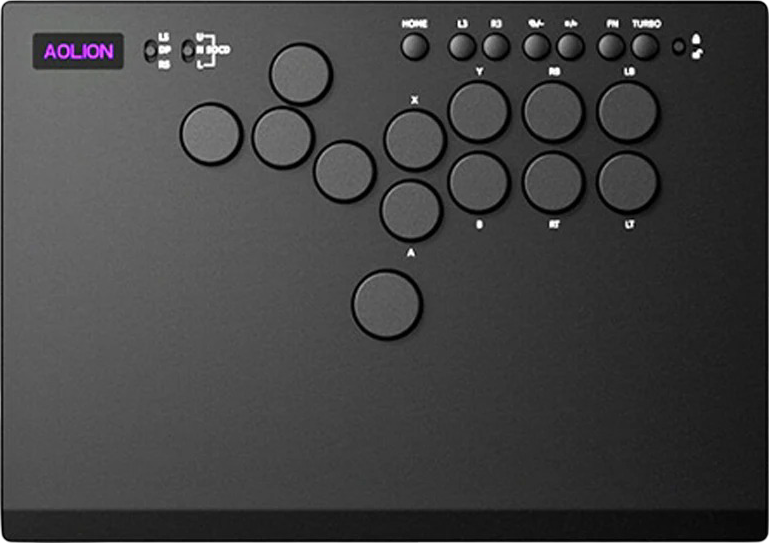
Can the Aolion Apex help you reach the apex of your gaming, specifically fighting games? It has a spacious wrist rest, and its 13th button can unlock possibilities that we’ll dive into deeper in this review.
Unboxing
You can tell from the Apex’s box that its codename is AL-P5366. Inside, you should find:
- 13 spare red switches
- Switch/button puller
- Tied USB-C cable
- English/Japanese manual
Performance
The Apex’s 13th button is the W button of the WASD button cluster. Usually, fighting gamers use the W button to jump. However, there are other hidden benefits to it…
One benefit of the Apex’s W button is to navigate menus more easily. Another benefit is if your fighting game of choice has an RPG-style campaign.
Finally, you can try mapping Drive Impact to the Apex’s W button if you’re a Street Fighter 6 player. Then, you can stick to pressing the medium punch and kick buttons together to Drive Rush your way to victory.
Speaking of the Apex’s attack buttons: they’re in the Vewlix layout, which seems like the second most popular layout nowadays, but it was definitely the most popular layout back in the day.
Otherwise, the Apex’s switches have an internal gasket that smooths out their sound. Here are the switches’ specs:
- Total travel: 2.0 ± 0.25 mm
- Actuation point: 0.8 ± 0.30 mm
- Actuation force: 40 ± 10 gf
- Rebound force: 15 gf/min
If the Apex’s ultra-low profile switches aren’t your style, just swap them out with the spare red switches, which aren’t as low profile—but still low profile. To the best of our knowledge, both the stock and spare switches are Kailh Chocs.
That said, the Apex’s spacious wrist rest is awesome. It can reduce not only wrist strain but also palm pain. Not only that, the wrist rest curves down near the edge.
As for the labels of the Apex’s tactile aux buttons:
- Home
- L3
- R3
- ⧉/-
- ◻/+
- Fn
- Turbo
And here’s an explanation of each of the Apex’s toggles:
| Toggle | Explanation |
|---|---|
| LS / DP / RS | Left stick mode D-pad mode Right stick mode |
| U / N SOCD / L | Up priority SOCD Neutral SOCD Last priority SOCD |
| Lock / unlock | Locks aux buttons Unlocks aux buttons |
Hardware
The Apex is a slim and light controller that’s a couple of inches bigger than your average tablet device. Its top panel is made of textured CNC aluminum alloy, whereas its bottom panel is made of CNC frosted acrylic. The bottom panel also has four circular silicone feet for extra stability.
Regarding the Apex’s buttons, they’re made of ABS. These flat buttons are approximately 23 mm—except for the approximately 26 mm jump button that’s bigger to easily press it with your thumb’s side. More about these buttons:
- Textured
- Sweat-proof
- Fingerprint-proof
Now, depending on your AliExpress listing of choice, you may be able to order an Apex bundled with a PS5 adapter. In its back left, this controller has a USB-A port where you can insert an adapter to make it compatible with the PS5.
Looking for the USB-C port to plug in the USB-C cable? The Apex actually has two USB-C ports:
- USB-C port in the back center
- USB-C port on the left side
Appearance
Topically, the Apex has a sleek all-black look. Even when you set the controller on a desk, it’s quite easy to see its RGB LED shine from under the top panel. The Aolion logo on the top panel shines in the same colors.
(By the way, don’t be mistaken that the Aolion logo is an OLED screen that shows you the Apex’s layout, which modes you’re in, and so on. It’s just an illuminated logo, which is still cool.)
You can control your Apex’s RGB LED settings by pressing the Fn aux button. Other than that, you may or may not like the fact that the PCB is visible through the bottom panel.
Conclusion
The Apex’s wrist rest is so spacious that your wrists can practically have a picnic on it. Not just that, the 13th button is a lifesaver when it comes to navigating menus, free roaming in fighting game campaigns, and even moving during matches (if you prefer the WASD layout).
- 13-button Vewlix layout
- Ultra-low profile switches
- Turbo mode
- Slim & light
- Circular feet
- Curved wrist rest
- Metal plus acrylic
- Beautiful RGB LED
- Three USB ports
- Expandable compatibility
Rating
⭐⭐⭐⭐⭐