
| Price | Etsy |
| Release | November 3, 2026 |
| Compatibility | NS2 / PC / Android |
| Dimensions | 8.5″ x 5.4″ x 0.9″ |
Introduction
Danger, danger… High voltage! Remember that song? Speaking of voltage, the VoltPad is a WASD controller that’s smaller than average. It’s about the size of a tablet, but it’s thicker.
On a side note, the VoltPad is from the UK—made by someone called Kaylum—and it’s always nice to have more sources of such controllers from this blessed region.
Unboxing
The only other thing that should arrive with your bubble-wrapped and boxed VoltPad is some documentation that lets you know valuable info about this neat controller.
Performance
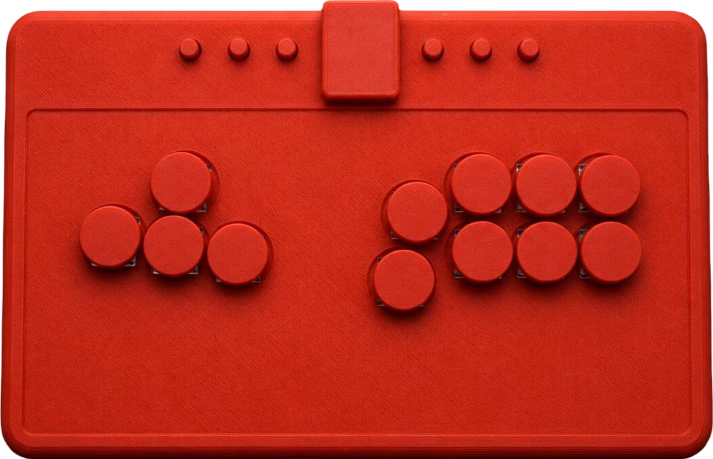
The VoltPad’s directional buttons are in a slanted WASD cluster for your comfort. These directional buttons can work as:
- D-pad
- Left stick
- Right stick
Meanwhile, the VoltPad’s attack buttons are in a modified Vewlix layout of sorts. You see, the attack button cluster’s bottom left button is a bit distanced from the rest. You may or may not dig this.
As for the VoltPad’s aux buttons, there are six of them, and you can find them on the top panel above the main buttons. These aux buttons are divided into two groups—with each group having three aux buttons. Having said that, let’s now solve the mystery of what these aux buttons do:
| Aux Button | Location |
|---|---|
| L3 | Left |
| R3 | Left |
| Select | Left |
| Home | Right |
| Start | Right |
| Capture | Right |
Hardware
The VoltPad’s plastic is so slim that you should be able to slip it into a tablet or laptop sleeve you have. Furthermore, you should be able to place it on your lap with comfort. Not only that, it’s also light.
The truth is that the VoltPad runs on the GP2040-CE firmware that’s:
- Reliable
- Low latency
- Open source
- Widely popular
- Web-configurable
- Decently compatible
- Supports SOCD cleaning
Otherwise, the VoltPad is a USB-C controller that runs on:
- Nintendo Switch 2
- Nintendo Switch
- PlayStation 4
- PlayStation 3
- Steam Deck
- Android
- PC
Appearance
Would you rather have your VoltPad in red, white, or black? All of these are possible options for you, although the black option seems to show off the controller’s beautifully textured look the most.
That said, it may or may not rustle your jimmies that you can see the VoltPad’s fast Kailh Choc V2 switches under the buttons (from certain angles).
Conclusion
The VoltPad is slim, light, has enough aux buttons to conquer modern fighting games, and runs on perhaps the best firmware. Needless to say, you should only consider this controller if you prefer the WASD layout.
- WASD layout
- Kailh switches
- Six aux buttons
- Slim and light
- Textured look
- Red, white, or black
- GP2040-CE firmware
- Unconventional Vewlix layout