
| Price | Etsy |
| Release | August 2, 2026 |
| Compatibility | NS2 / PC / Android |
| Dimensions | 16.4″ x 9.4″ x 3.0″ |
| Weight | 5.84 lbs |
| Cable | 3 m |
Introduction
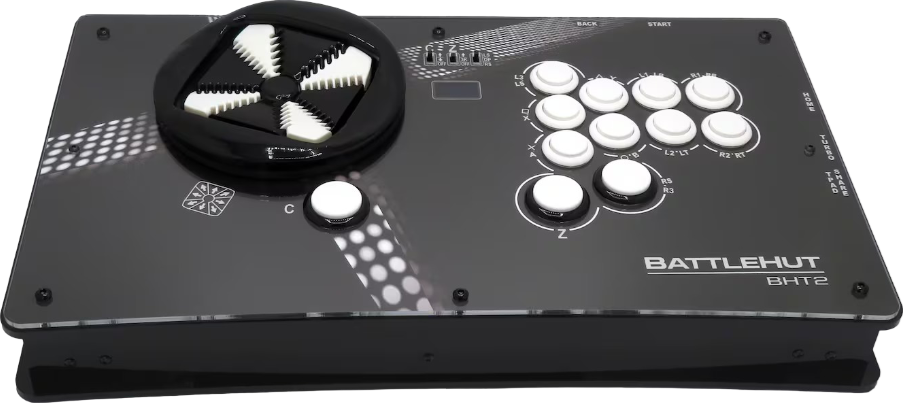
Compared to its predecessor, one of the BattleHut BHT2’s right thumb buttons has been repositioned so that it’s under the attack button cluster, whereas the left thumb button transformed from an unusual-looking button to a circular button. By using toggles:
- The directional buttons can simulate D-pad, left stick, or right stick inputs.
- The right thumb button can be set to up or three kicks.
- The left thumb button can be set to up or down.
Unboxing
In addition to an instruction manual, a right angle USB-C to A cable should be included with your purchase of a brand new BHT2, and the cable’s color is black (like a good chunk of the controller).
Performance
The BHT2 gives you access to all three of:
- Leverless
- WASD
- D-pad
You see, the BHT2’s directional buttons kind of look like a D-pad. With Kailh linear microswitches, 35 gf actuation force, and 2 mm travel: the D-pad’s buttons give you diagonal input access in eight directions—plus easier sliding motions. The concavity reduces movement and fatigue. By the way, you can expect to use three of your left hand’s fingers for directional inputs.
Regarding the BHT2’s attack buttons, these are nine Sanwa OBSF-24 buttons with two more Sanwa OBSF-30 buttons. One could say that Sanwa buttons’ travel distance is near perfect.
Now, behold the BHT2’s function buttons and their locations:
| Function Button | Side |
|---|---|
| Home | Right |
| Turbo | Right |
| Touchpad/share | Right |
| Back | Rear right |
| Start | Rear right |
Hardware
While BattleHut is a French company, the BHT2’s hardware is partly German. With PMMA panels, this is a partially 3D-printed controller, and here’s a more precise breakdown of its materials:
- PMMA: durable, scratch-resistant
- PVB: smooth, semi-glossy, impact-resistant
- PLA: lightweight, rigid
Meanwhile, the OLED screen near the top panel’s center indicates that the BHT2 runs on the popular GP2040-CE firmware, which often shows you the five following details on the screen:
- Button press animation
- SOCD cleaning mode
- Directional mode
- Input method
- Turbo speed
Other than that, the GP2040-CE firmware is low latency, open source, and updatable online. The firmware also has decent compatibility options, especially because the compatibility can be extended by a converter you own.
You can insert your converter into a USB-A port found on the BHT2’s left side. On the left side too is a USB-C port for when you need to connect the controller to a console or PC.
Appearance
Good news: You can mod your BHT2’s artwork. If you need custom artwork, we at The Arcade Stick can offer you our artwork service. This way, the controller can represent your favorite:
- Character
- Game
- Movie
- Show
- Something else
Conclusion
There are many reasons to buy the BHT2—with the main reason being its D-pad that has eight buttons in a way that may unlock in-game advantages you never thought were possible until now.
- Eight-way D-pad
- Sanwa buttons
- Kailh microswitches
- Turbo functionality
- Informative screen
- Right angle cable
- Reliable firmware
- Durable hardware
- Customizable artwork
- Extendable compatibility
Rating
⭐⭐⭐⭐⭐